How to Get Cited in Naver AI Briefing: A 10-Point Content Checklist
Learn what Naver says about content AI Briefing can cite, run a 10-point pre-publish checklist, and use VIVI to check citations and improve your posts.
Learn what Naver says about content AI Briefing can cite, run a 10-point pre-publish checklist, and use VIVI to check citations and improve your posts.
Learn what Naver says about content AI Briefing can cite, run a 10-point pre-publish checklist, and use VIVI to check citations and improve your posts.
Learn what Naver says about content AI Briefing can cite, run a 10-point pre-publish checklist, and use VIVI to check citations and improve your posts.
Learn what Naver says about content AI Briefing can cite, run a 10-point pre-publish checklist, and use VIVI to check citations and improve your posts.
You publish on a Naver blog or your own site on a regular schedule, yet Naver AI Briefing rarely seems to surface your content. Where do you start?
Start by asking whether each piece answers a question your customers actually ask. Then check whether it draws on first-hand experience and evidence readers can verify, whether the key information is easy to find, and whether the details are current.
Meeting those standards doesn't tell you how AI Briefing uses your content, though. You have to check that separately. Once you can see which questions cite your content, and which pages get cited in your place, it's much easier to pinpoint what to fix in your existing posts.
This article turns Naver's published content guidance into a pre-publishing checklist. It then shows how to use VIVI to see where your content is cited and improve it.
Naver Search published guidance on writing for the AI era on May 26 and June 4, 2026. It boils down to five points: useful information grounded in first-hand experience, subject expertise, credible evidence, an easy-to-read structure, and up-to-date information.
So what does AI Briefing cite in practice? VIVI's Korea data, collected from October 11 to November 7, 2026, shows that 40.6% of the URLs cited in Naver AI Briefing were Naver blog posts (blog.naver.com). By content type, tutorials took the largest share, at 20.5%.
Naver's guidance and the citation data point the same way: make your content more credible and complete, and explain what customers want to know in concrete terms. If you publish how-to or troubleshooting content, check whether you give enough real examples and step-by-step explanation.
These figures only cover content that was already cited. They don't show that publishing a tutorial raises your chances of being cited, so treat them as a starting point for your own checks.
To see how citation sources differ between Naver and other AI search engines, read Naver AI Briefing vs. Google AI Overviews vs. ChatGPT (Korean).
How do you apply these principles to real content? When you plan a new article or revise an old one, focus on four areas: answers to customer questions, reliability of information, structure, and freshness. Use the ten items below to find what to improve.
Instead of repeating the obvious point that running a Naver blog matters, show which posts were actually cited and how they answered the customer's question. Specific examples help more.
In AI search content especially, separate what you observed from how you interpret it. If you report that a certain format was cited often, state the scope of the analysis so readers can judge what the data means.
Good structure isn't about satisfying a format. It helps readers and search systems find and understand the information they need.
An article explaining how AI search citations work and one on optimizing product detail pages, for example, can link to each other while answering different questions.
For more specific writing guidance, see How to Write a Naver Blog Post That AI Can Cite: A Structure Checklist (Korean). For a general English template for posts AI can cite, see Elements You Should Adopt to Make Your Blog Indexed in ChatGPT.
| Before | After | |
|---|---|---|
| Subheading | Thoughts on AI Briefing | How can I check whether Naver AI Briefing cites my content? |
| Body | AI Briefing is becoming more important these days. | To check whether AI Briefing cites your post, review the answer to each question along with its source URLs. |
| Comparison info | Key comparisons provided as a single image | Key comparisons written as a table in the body, with the image as supporting material |
As the examples show, the subheading should state the question readers are asking, and the body should answer it concretely. Comparison details also work better as text than when they live only inside an image.
Once you've reviewed your content and structure, check how Naver AI Briefing actually uses it. Pick questions your customers are likely to search, then see whether your brand appears in each answer and which content is cited as a source. You need to check many questions on an ongoing basis, so collecting and comparing this data by hand is hard for most marketing teams.
BubbleShare's VIVI is a solution that automatically collects and analyzes answers and cited sources from multiple AI search engines. You can use it to see brand mentions and citations by question, compare against competitors' content, and decide what information to add. Here is what each screen shows, in the order you'd use them.
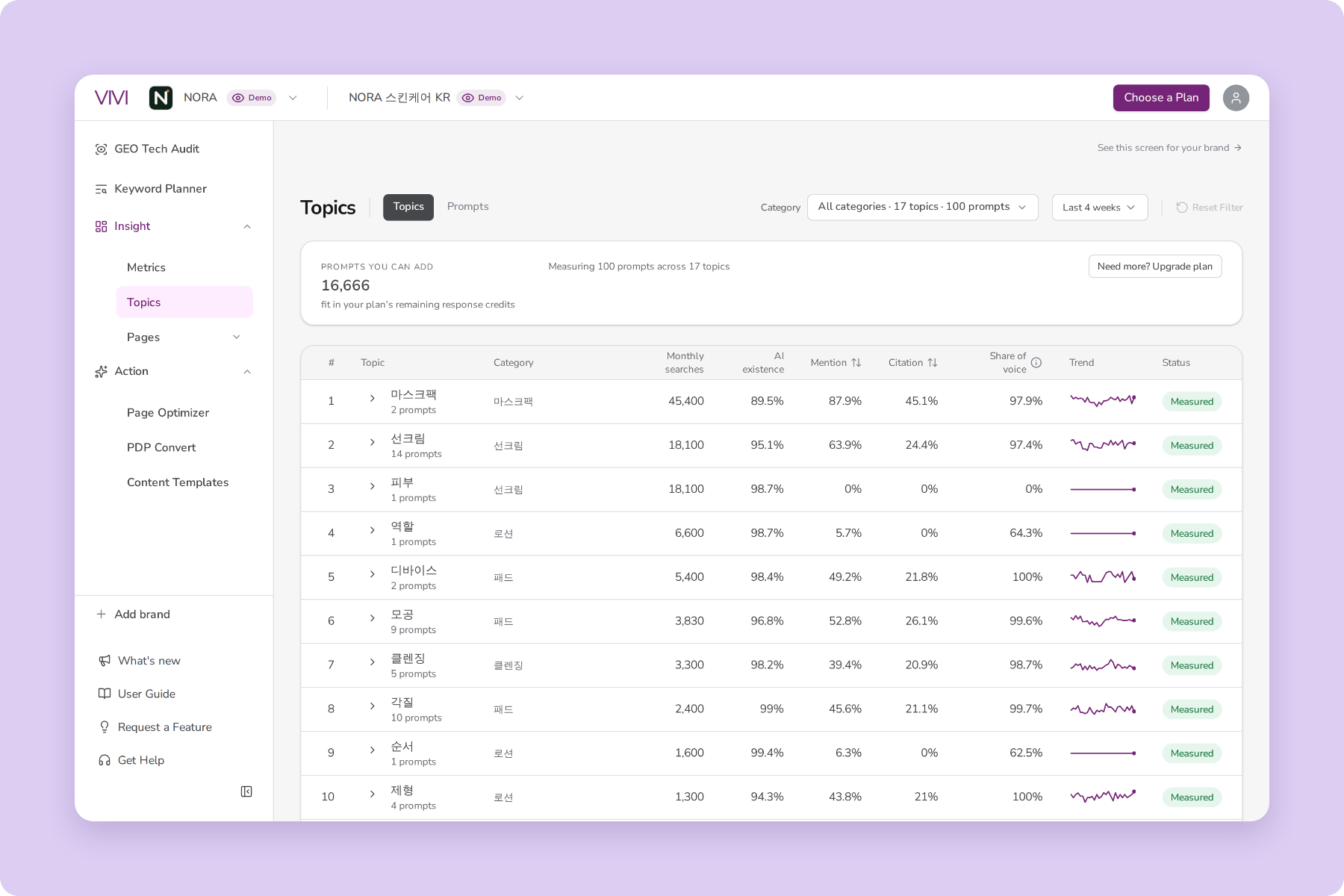
First, register your brand and measurement market in VIVI and select NAVER as the AI engine. Then open Topics to see the themes and tracked questions related to your brand.
For a skincare brand, for example, you might look at questions shoppers search when they explore or compare products:
Looking at your content through customers' questions shows which information needs your published posts already answer, and which topics still need new content. If a question isn't tracked yet, add it in Topics and start monitoring it.
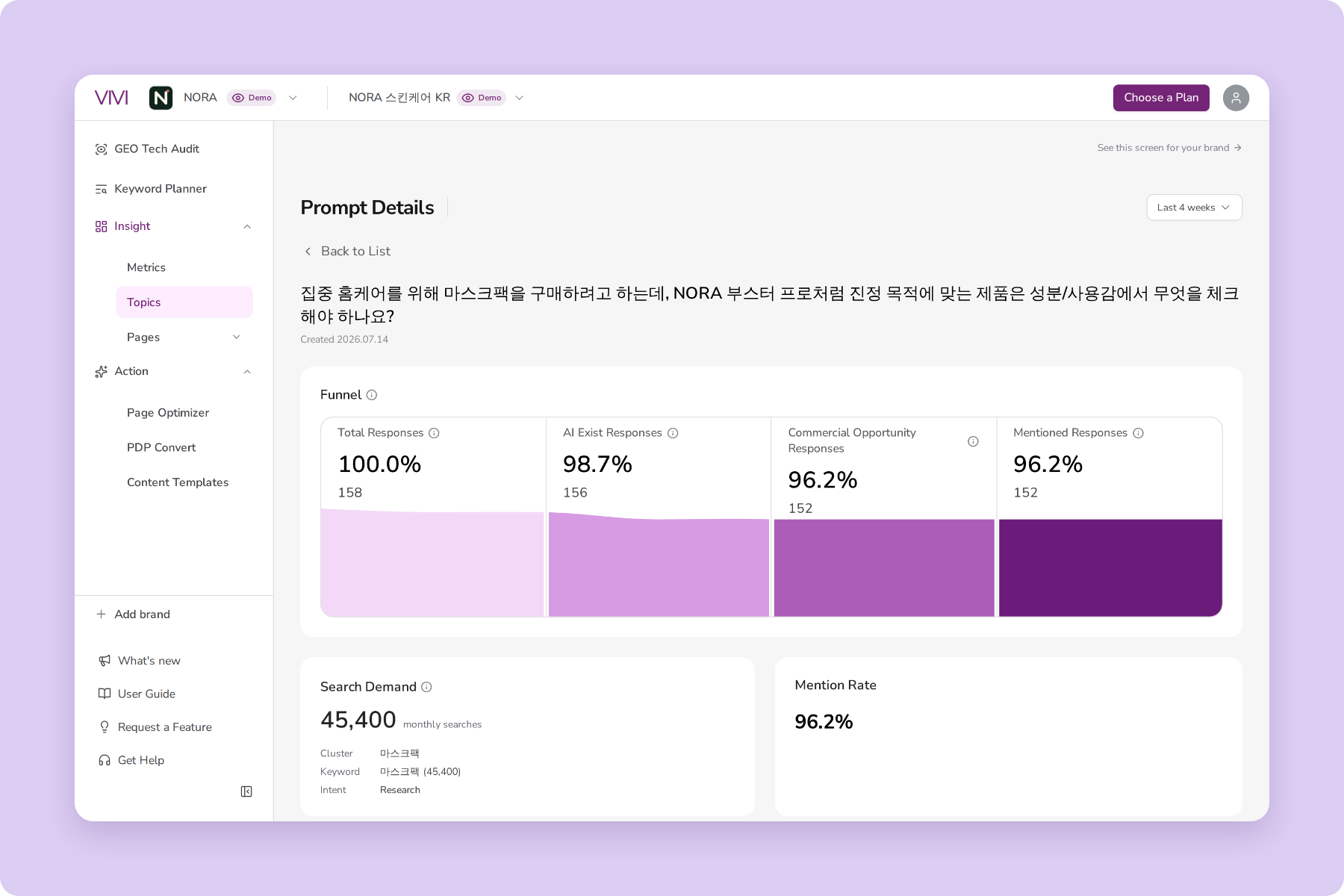
Once you've chosen your questions, open Prompt Details to read the full AI answer and the cited URLs for each one. Focus on three things:
Say a question like "how to check whether Naver AI Briefing cites your content" returns only a competitor's guide as a source. You can look at the steps and evidence that guide provides. Your own article may answer the same question but lack screenshots or a procedure readers can follow.
Comparing cited content with your own shows what your article is missing, and helps you rank your next edits.
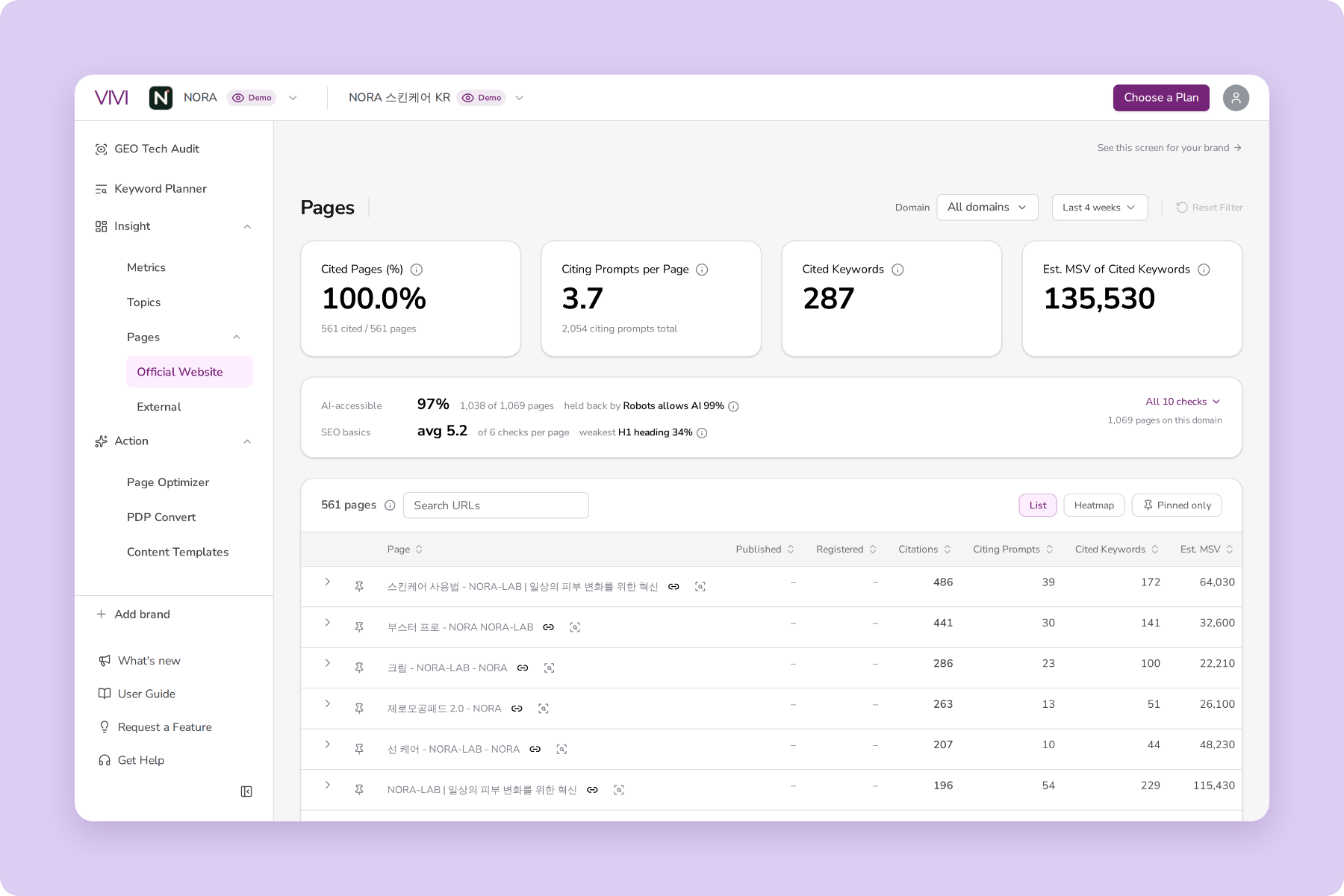
After you've checked individual questions, look at citation status by published content. Which screen you use in VIVI depends on where the content is published.
| Where the content is published | Where to check in VIVI |
|---|---|
| Your website or blog | Pages > Official Website |
| Your official Naver blog | Pages > Channels |
| External reviews, sponsored blogs, etc. | Pages > External |
Keep your own domain's Citation Rate separate from the citation status of your Naver blog content. Citation Rate is calculated from the homepage domain you register. For posts published on a Naver blog, don't rely on your homepage's citation rate. Check their citation status separately in Channels.
Once you register your official Naver blog channel, you can see citation counts by channel, which content was cited, and the questions it appeared for. That shows which posts AI Briefing cites and which questions they connect to.
Checking AI answers one question at a time and logging every cited URL takes a lot of time. In VIVI, you can see the AI answer, brand mentions, and cited sources for each question in one place, and compare them with competitors.
Want to see the actual analysis screens? Try the demo first. You can browse how it shows answers by question and the content they cite.
→ Try VIVI's AI citation analysis
Once you've checked the AI answers and cited sources, turn what you found into content improvements. When your content isn't cited for a question, look at what's cited instead. That tells you whether to add missing information, restructure an existing article, or plan a new one.
If customers want information your article doesn't contain, fill it in. If the information is there but only inside an image, provide it as body text. Here's what to review first, depending on the state of the content:
| What you found | What to review first |
|---|---|
| The article lacks information customers want | Add specific examples, figures, and comparison details |
| The information is there, but the structure is confusing | Clean up the title, subheadings, and paragraph structure |
| Key information appears only in an image | Provide the important information as body text |
| Outdated information remains | Check current sources and update the content |
| No existing content answers the question | Plan new content |
To check the structure and accessibility of a published article, use VIVI Content Assistant. When you inspect a page in the Chrome extension, it checks AI accessibility, content structure, and trust-related items, and shows what needs improvement.
If your heading structure has a problem, for example, you can see where to look. You can also check whether important content is provided in a form search systems can access. Use the results to decide which fixes to make first.
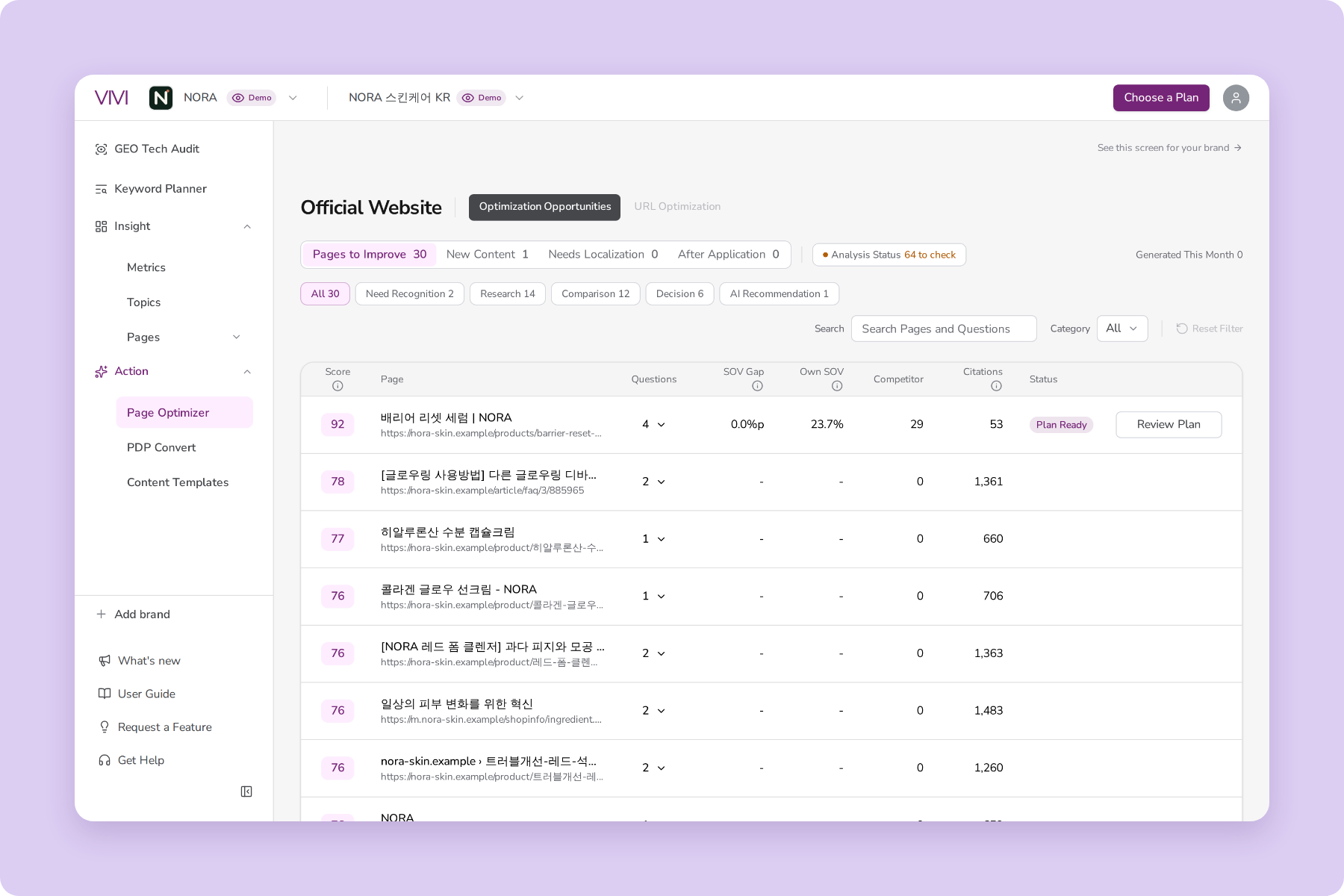
If you need more specific recommendations, use Page Optimizer. VIVI Page Optimizer analyzes a page and its related questions, then suggests ways to fill gaps in information and structure.
Its suggestions fall into four main directions:
When you review the suggestions, accept only those that match your actual product information and sources. Naver blogs use the platform's own editor, so treat the generated suggestions as a reference and edit the post text yourself.
After you update content, check what changed in the AI answers. In VIVI, Metrics > Compare lets you compare brand mention rate and citation rate across two periods. For changes to posts on your Naver blog, as well as your own website, use the relevant screens under Pages.
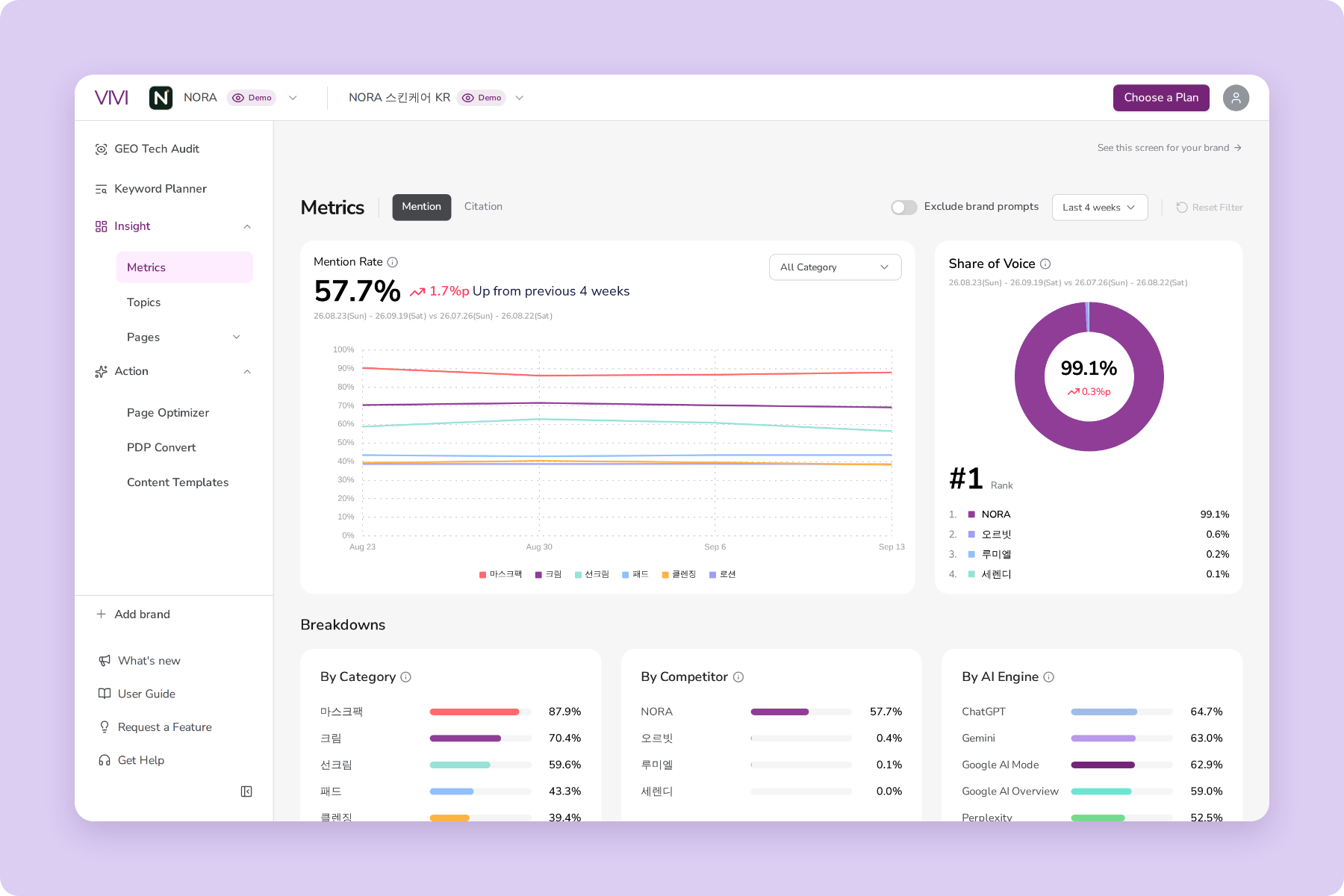
When you compare before and after, check three things:
Track the trend over a period using the same questions and AI engine, and check the response count as well. That gives you a more accurate read on what changed after your updates.
Naver AI Briefing doesn't generate an answer for every search term. When you read mention rate and citation rate, also check AI Existence, the share of responses where an AI answer was actually generated.
Writing for Naver AI Briefing starts with content that answers customers' questions in concrete terms. Include first-hand experience and evidence readers can verify, and present key information in a structure that's easy to read.
The next step is to see how AI answers actually use your content, then feed what you learn into your next round of improvements. Knowing which questions bring up your brand, which posts get cited, and what competitors cover that you don't gives your content work a clearer order of priority.
VIVI is built for repeating that analysis. You can check brand mentions and citations in Naver AI Briefing and other AI search engines, and find the content that needs work.
For which customer questions does your brand appear? Start a 7-day free trial of VIVI to find out, and use the result as the starting point for your next content improvements.
→ Start your 7-day free VIVI trial
Give each channel a distinct role. Use your website for official information about your brand and products, including features, pricing, and conditions of use. Use a Naver blog for how-to guides and real examples that answer customer questions. Rather than choosing one channel, find out which customer questions each channel's content answers, and check its actual citation status.
In VIVI's Prompt Details, you can see the AI answer and cited URLs for each question. For content on your own website, check Pages > Official Website. For your official Naver blog, check Pages > Channels.
First check whether the edited post is cited, and for which questions. Then use Metrics > Compare in VIVI to see how brand mention rate and citation rate changed between periods, and compare the citation status of individual posts in Pages. Measuring against the same questions and AI engine makes the change easier to interpret.