Optimizing Your Solution Page for AI Search: What Should Your FAQ Include?
What should a solution page FAQ include, and how much does structured data matter for AI search? A guide based on Google's guidance, plus how to audit your page with VIVI.
What should a solution page FAQ include, and how much does structured data matter for AI search? A guide based on Google's guidance, plus how to audit your page with VIVI.
What should a solution page FAQ include, and how much does structured data matter for AI search? A guide based on Google's guidance, plus how to audit your page with VIVI.
What should a solution page FAQ include, and how much does structured data matter for AI search? A guide based on Google's guidance, plus how to audit your page with VIVI.
What should a solution page FAQ include, and how much does structured data matter for AI search? A guide based on Google's guidance, plus how to audit your page with VIVI.
B2B solution pages cover everything from key features and technical differentiators to customer cases. But do they explain what prospects want to know when they're actually evaluating a purchase?
Say a customer asks AI, "Which AI customer support solution works with our existing helpdesk?" To compare solutions, AI needs to see each one's supported systems, how it hands conversations to human agents, and how it handles data. If your website doesn't state these things, your solution's strengths may not come through in the AI's answer.
The same goes for visitors on your site. A prospect may like your main features, but without enough information to judge whether the product will work in their environment, they're unlikely to request a demo or send an inquiry. An FAQ can fill that gap. If you turn what your sales team keeps explaining (supported environments, onboarding steps, security policies) into questions and answers, you give AI search an official source to reference and help prospects evaluate the product.
So what questions belong in an FAQ? Do you need FAQ structured data for AI search to use it?
This post looks at how to build the FAQ a solution page needs and what structured data does, then shows how to use Bubbleshare's VIVI to check a page for missing information and optimization issues.
A solution page should show off the product's strengths and also give prospects what they need to judge whether adoption is realistic. B2B buyers in particular often check compatibility with their existing systems, conditions of use and security policies before they commit.
Without that information, a customer who likes the product can't tell whether it fits their workflow. In AI search, a page without specifics makes it hard for AI to describe your solution against the conditions a customer states. So rather than listing the features you want to promote, build the page around the questions customers will ask while they evaluate a solution.
A company that sells an AI customer support automation solution could check its solution page against a structure like this.
| Page section | What customers want to know | What to include |
|---|---|---|
| Product overview | Which support tasks can it automate? | The solution's purpose, target customers, the problem it solves |
| Key features | Which customer inquiries does the AI handle? | Scope of automatic replies, how it hands off to agents, usage scenarios |
| Supported environments | Does it work with our existing support system? | Supported CRMs and helpdesks, integration methods, conditions |
| Customer cases | How do real companies use it? | Customer cases and results you can share publicly |
| FAQ | What should we confirm before adopting? | Data security, supported languages, onboarding steps |
| Contact | Can we use it at our company? | Demo request and inquiry paths |
Information customers use to compare products, such as technical specs and supported environments, should appear as body text or an HTML table, not only as images. Describe key features specifically too. Instead of something abstract like "improves support efficiency," say which inquiries it handles automatically and when it hands off to an agent.
When you tie each product feature to a customer question, prospects find what they need more easily, and AI search gets official information it can reference.
Once you've explained key features and supported environments, the FAQ can cover what buyers ask next as they evaluate adoption. That means how a feature behaves in a specific situation and what adoption requires, written as questions and answers.
Start with the questions that keep coming up in sales meetings, adoption inquiries and customer support. For an AI customer support automation solution, an FAQ could look like this.
| FAQ question | What the answer should include |
|---|---|
| Does it work with our existing support system? | Supported CRMs and helpdesks, integration methods and conditions |
| How are inquiries the AI can't answer handled? | Conditions for handing off to an agent and the handoff process |
| Does it support Korean and Japanese customers? | Supported languages and feature scope for each |
| How is customer inquiry data managed? | Data storage, access permissions, related policies |
| How do we measure the results of support automation? | Automatic response rate, agent handoff rate, how each is measured |
What matters more than the number of FAQs is whether each answer has what a buyer needs to decide. If the question "Does it work with our existing support system?" is answered only with "We support a wide range of support solutions," the customer can't confirm compatibility. If you state the actual supported systems, the integration method and the conditions, the customer can judge whether it will work in their environment.
When you write up what your sales team keeps explaining, prospects can cover the basics before a sales meeting, and your sales team can spend its time on specific adoption conditions and requirements.
Structured data tends to come up when you build an FAQ. If you write questions and answers and also apply FAQPage schema, will AI search cite you more often?
Here you need to separate two roles: FAQ content that gives customers information directly, and structured data that passes page information to search systems. Google doesn't require separate structured data or any special schema.org markup for generative AI search. FAQ rich results also stopped appearing in Google Search on May 7, 2026. So the point is to use FAQs and structured data for what each is meant to do.
| Item | Main role | What to check in practice |
|---|---|---|
| FAQ content | Answers customers' specific questions | Does it include enough information for real customer questions? |
| Structured data | Describes the information on the page in a set format | Does the markup match what's shown on the page? |
| AI search citation | AI uses a web page as a source when it generates an answer | Is the page cited for real customer questions? |
Google recommends using structured data as part of your regular SEO strategy. On a solution page, you can consider types such as Organization for company information and SoftwareApplication for software product information.
Structured data must match what's actually shown on the web page. And instead of splitting every paragraph into tiny pieces or padding the FAQ with near-duplicate questions, give customers clear, useful, trustworthy information. Google also stresses the importance of content written for readers in generative AI search.
If you're a B2B marketer, first check whether the body and FAQ give customers what they need while they evaluate adoption. Structured data is a supporting tool for passing that information to search systems.
Once you've organized the FAQ and product information, check the live page for things to improve. It helps to separate two checks: the page's technical structure, and whether it gives customers enough information. With Bubbleshare's VIVI, you can use Content Assistant to audit the page's AI search optimization and Page Optimizer to find where it doesn't answer customer questions well enough, then fix those gaps.
VIVI Content Assistant is a Chrome extension that audits a web page's AI accessibility, content structure and more, and tells you what to improve. Run it on your solution page and choose "Audit this page" to get a score out of 100 and results across nine areas, including AI crawler accessibility, structured data and metadata.
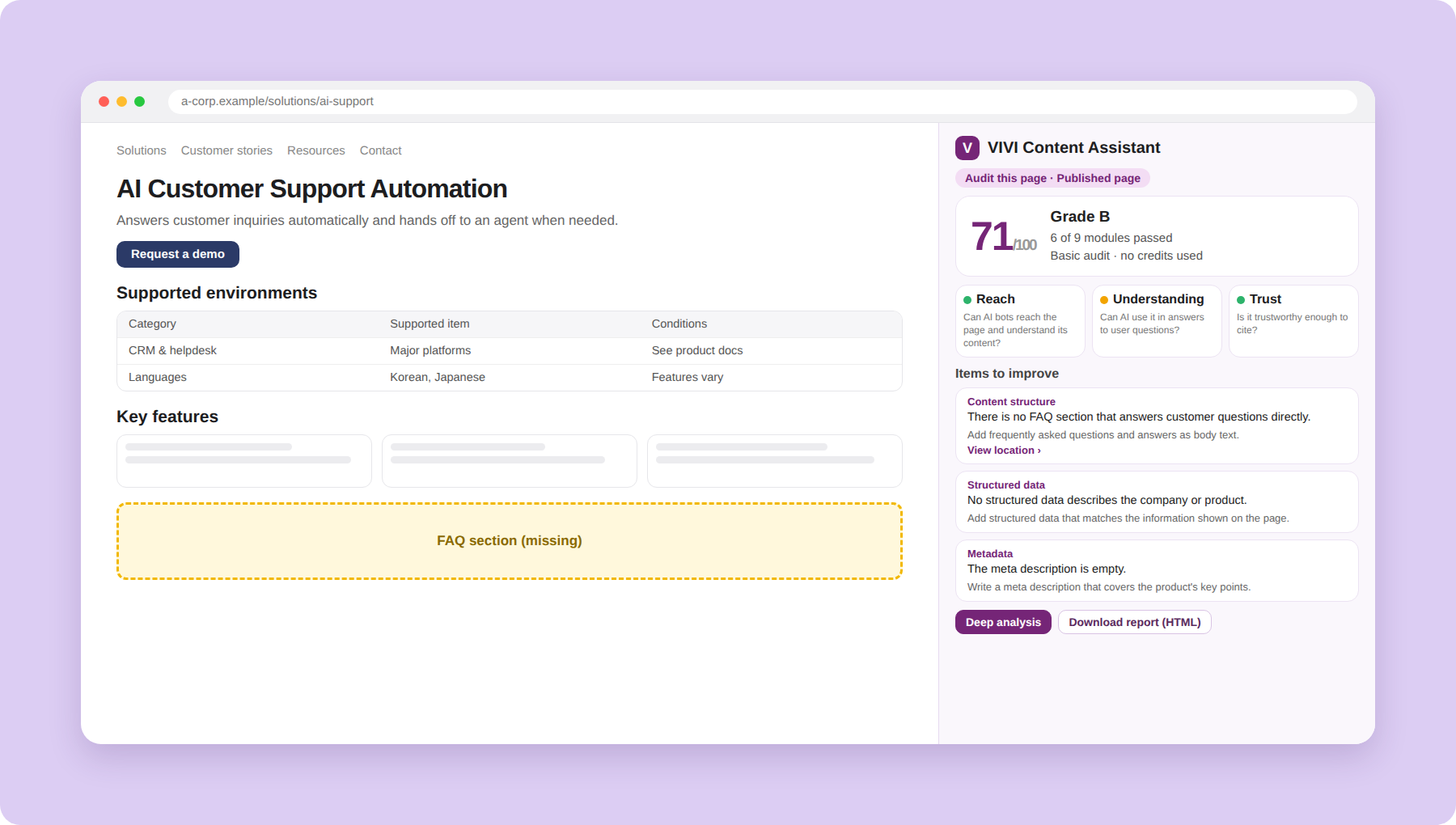
If metadata is missing or the heading structure is off, the results show what to fix. If you only provide key product information as images, check whether the same content also appears as body text or an HTML table.
Content Assistant lets you find what to fix on the page and turn it into actual edits. Marketers can change what they can edit themselves. For items that need development work, such as HTML structure, download the audit report and share it with your website team.
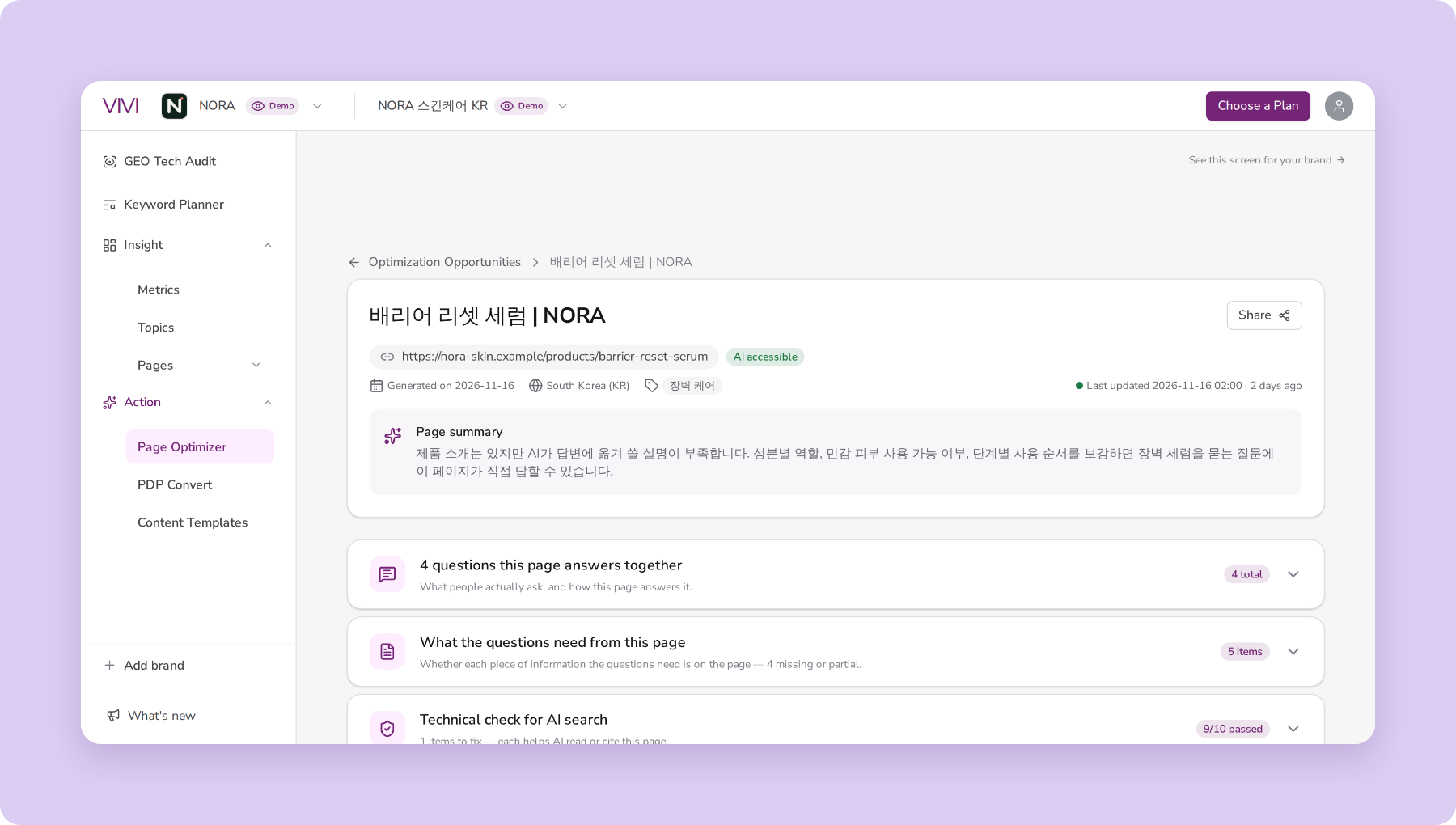
After Content Assistant shows you the page's structural issues, Page Optimizer lets you check where the content falls short against customer questions.
In VIVI Page Optimizer, go to Official Website > URL Optimization, analyze your solution page and generate an improvement plan. You can then see how well the page answers customer questions. The coverage status for each question helps you decide what to add.
| Question coverage | Meaning | How to improve |
|---|---|---|
| Covered | The page has the information the question needs | Keep the existing information |
| Partly covered | Only some of the information is there | Add the missing conditions or explanation |
| Missing | The page has nothing on the question | Consider adding an answer to the body or FAQ |
| To confirm | Needs further checking | Confirm the facts with your product team |
Say the question "How are inquiries the AI can't answer handled?" shows as Missing. Check whether the page explains how conversations are handed to an agent. If your product supports handoff to a support agent, you can add the handoff conditions and process to the body or the FAQ.
Just as Content Assistant connects audit results to edits, Page Optimizer lets you find missing information and draft content improvements. Marketers can pick the suggestions they need and download the finished HTML to apply it to their own website.
After you improve your solution page, use Pages > Official Website in VIVI to see each page's citations and the questions that cited it (Citing Prompts). That shows which customer questions use your updated page as a source in AI answers.
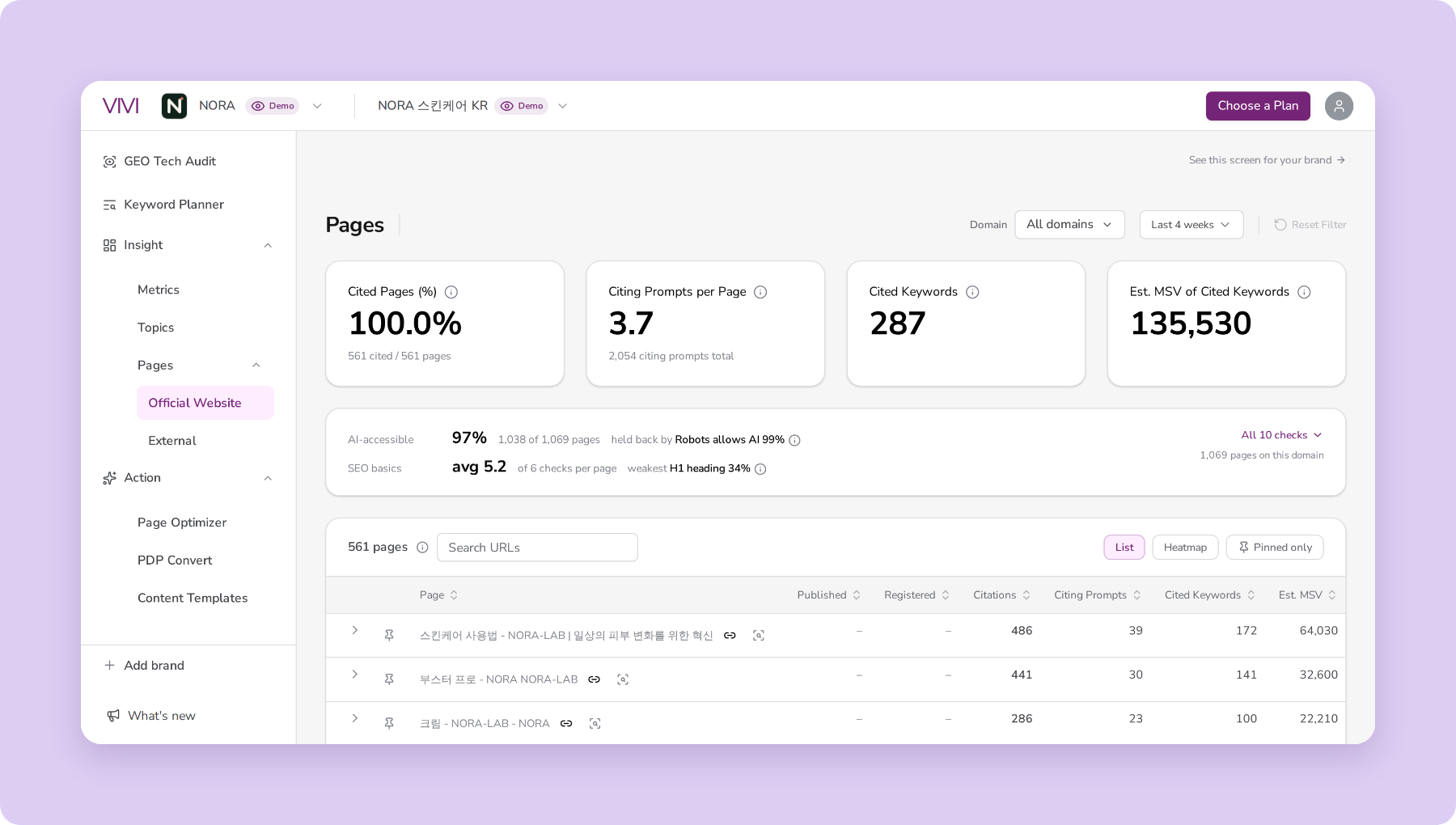
Say you've added more detail on how conversations hand off to agents. Look at whether the page is cited for a question like "AI chatbot solutions that can hand off to a human agent." Watching the citation trend over a period, along with changes by question, helps you see how the page is being used in AI search after your edits.
Does your solution page have the information customers want before they adopt? With a 7-day free VIVI trial, you can audit the page's optimization in Content Assistant, and check question coverage and improvement suggestions in Page Optimizer.
Audit your solution page with a 7-day free VIVI trial →
After you audit your solution page, start by filling in what prospects need to understand the solution and evaluate adoption. You can set improvement priorities from the results. If your main features and supported conditions are well covered but inquiries are low, for example, look at the information customers still need and at your demo request path.
| Audit result | What to improve next |
|---|---|
| Key product information appears only as images | Provide features and supported environments as text and HTML tables |
| Metadata or heading structure has issues | Revise so they describe the page accurately |
| Customer questions show as Partly covered or Missing | Fill in missing details such as conditions of use and onboarding steps |
| Structured data is missing or doesn't match the page | Confirm the purpose, then correct it to match the page content |
| The page is rarely cited in AI answers | Compare the AI answers for related questions and competitors' cited sources |
While you add product information AI search can use, also design the path that takes interested customers to an inquiry. Give buyers enough to compare products, and point those who need a closer look to a demo request or an inquiry.
After your improvements, check how the AI answers and cited sources change for the same customer questions. If you also watch page visits, demo requests and inquiries in a web analytics tool, you can evaluate AI search visibility and real marketing results separately.
When you optimize a solution page for AI search, look beyond the number of FAQs or whether you have structured data. Check whether the page gives prospects enough to explore and compare the product.
Write up the features, conditions and onboarding steps your sales team explains again and again. The FAQ delivers that information question by question, and structured data can describe the page's content to search systems.
With Bubbleshare's VIVI, you can audit a page's optimization with Content Assistant, and use Page Optimizer to find gaps and opportunities against customer questions. You can then check whether the page is cited in real AI answers.
Does your solution page have what customers need when they evaluate adoption? Start a 7-day free VIVI trial, audit the page, and improve what needs it first.
Start your 7-day free VIVI trial →
FAQ structured data alone doesn't guarantee citations in AI answers. Google says structured data isn't required for generative AI search, and FAQ rich results stopped appearing on May 7, 2026. Check whether the FAQ body gives customers enough of the information their questions need.
You can consider Organization for company information and SoftwareApplication for software information. When you apply them, follow Google's guidance for each type and make sure the markup matches what's shown on the page.
VIVI Content Assistant audits your existing page structure and structured data, and in supported CMS editors, its editor check can generate FAQ drafts and technical fixes. Page Optimizer analyzes how well a page covers the target prompts you've set up and suggests improvements to the content's structure and substance. Review anything generated against your actual product information and official materials before you apply it.