How to Check Whether Your Press Release Gets Cited by AI: A GEO Guide for PR Teams
Track whether your press release and the articles rewritten from it are cited in AI answers. Includes a 6-point checklist and a VIVI walkthrough.
Track whether your press release and the articles rewritten from it are cited in AI answers. Includes a 6-point checklist and a VIVI walkthrough.
Track whether your press release and the articles rewritten from it are cited in AI answers. Includes a 6-point checklist and a VIVI walkthrough.
Track whether your press release and the articles rewritten from it are cited in AI answers. Includes a 6-point checklist and a VIVI walkthrough.
Track whether your press release and the articles rewritten from it are cited in AI answers. Includes a 6-point checklist and a VIVI walkthrough.
You sent out a press release, and several outlets ran it. Your agency also sent a performance report with the number of placements and a list of publications. But here's what that report can't tell you: are those articles being used as evidence when ChatGPT and other AI search tools describe your brand?
A standard PR report shows where a story ran. It doesn't show how AI uses it. And AI doesn't only pull from your original release. It can also cite another outlet's rewrite of it, so tracking the original URL alone can miss citations that trace back to your announcement.
PR teams now need to see which articles get cited in AI answers, and which customer questions your brand's information shows up in.
This post covers how news coverage shows up in AI search, then walks through using Bubbleshare's VIVI to track AI citations for one press release, both the original and the rewrites. You'll also get a checklist for your next release and a few metrics to add to your PR report.
Placement counts and outlet-by-outlet coverage show how far a release spread. They don't show how AI search uses it.
AI pulls from more than your own website. It also cites news articles, blogs, and community posts. And one press release can turn into several articles with different headlines and different details, so the sources AI cites can vary just as much.
VIVI's Korea data, collected from October 11 to November 7, 2026, shows news content turning up as a citation source.
| AI search engine | Share of citations from news |
|---|---|
| Naver AI Briefing | 1.8% |
| ChatGPT | 3.8% |
| Google AI Overviews | 7.4% |
| Gemini | 8.5% |
News citations also aren't concentrated in a few outlets. Citations classified as news were spread across 1,040 domains, and the top 10 domains together made up only 20.6%.
For a PR manager, that means knowing whether a handful of major outlets ran your story tells you little about AI visibility. Two articles on the same announcement can have different headlines and details, so tracking the press release alone can miss citations of related coverage.
Say you announce a new feature for an enterprise data integration product. AI might skip your release and cite an IT trade publication's article about the feature instead. To see the full effect of your PR work, check citations of the release you distributed and of the articles written from it.
Using the exact product name, stating what you're announcing, and backing up key claims is routine for PR teams. For AI search, add two more questions: does the core information stay clear if the story gets rewritten, and can you track citations after distribution?
If you're a B2B company putting out several releases about one product (a launch, a feature update, a customer win), AI needs something to tell them apart. Name the product, but also the specific feature name or key phrase that belongs only to this announcement. That makes related articles easier to identify.
In B2B releases, technical differentiators and performance numbers carry the message. "We improved data processing speed" says little. Say which task got faster and measured against what. When a feature or number comes with its conditions, it keeps its meaning even after another article or an AI answer picks it up.
What you want to say and what prospects want to know are often different. If you're announcing a feature for a data integration tool, go beyond the launch itself and list supported data sources, environments, and compatibility with existing systems.
Picture a customer asking an AI, "Which ERP systems does this work with?" Is there an answer in your release or your official content?
An article may cover only part of what you announced, depending on its length and editorial angle. Link the release to a product page or technical doc so that specs and conditions that didn't make the article are still available from an official source. If that page is accessible to search engines, AI search can use it to check the details too.
If the release exists only as a PDF or an image, put the key content on a web page as body text too. Use a clear title and structure, and check that the page is indexed, so AI search systems can collect and use it.
For every release, record the original URL, the keywords unique to the announcement, and the distribution date. When other outlets change the headline and reword the sentences, these let you identify the articles tied to your announcement.
Once the release is out, the next step is to see how AI actually uses it in answers. What sets VIVI's PR feature apart is that it covers more than the release you distributed. Register one press release, and VIVI also links news articles cited by AI that were rewritten from it or mention it in part.
For example, Company A distributes one release about a new feature, and some of the IT outlet articles based on it get cited in AI answers. You can see those citations as results of that same release. Articles from outlets you never registered can be included in the analysis, which is the difference from tracking only the original URL.
If you want to add AI citation data to the coverage report from your agency, you can check it in VIVI directly. Sign up, then follow the steps below to register a release and see its related articles and AI citations.
Start a 7-day free VIVI trial to check your press release citations →
Let's say Company A, which sells an enterprise data integration solution, just distributed a press release about a new feature. Here's how the analysis goes.
In Pages > PR, choose Add PR and enter the press release URL. If it has no public URL, you can paste the text instead. Then set three keywords that VIVI uses to find news articles related to this announcement among the ones AI has cited.
| Setting | What it means |
|---|---|
| Product names | Name of the product or service being announced |
| Announcement keys | Feature name or distinctive phrase specific to this announcement |
| Context words | Additional keywords that help judge whether an article is related |
If Company A launched an automatic ERP sync feature for "ConnectFlow," you'd build the keywords around the product name and the new feature name. You can also set a Matching period to limit the time window for linking articles.
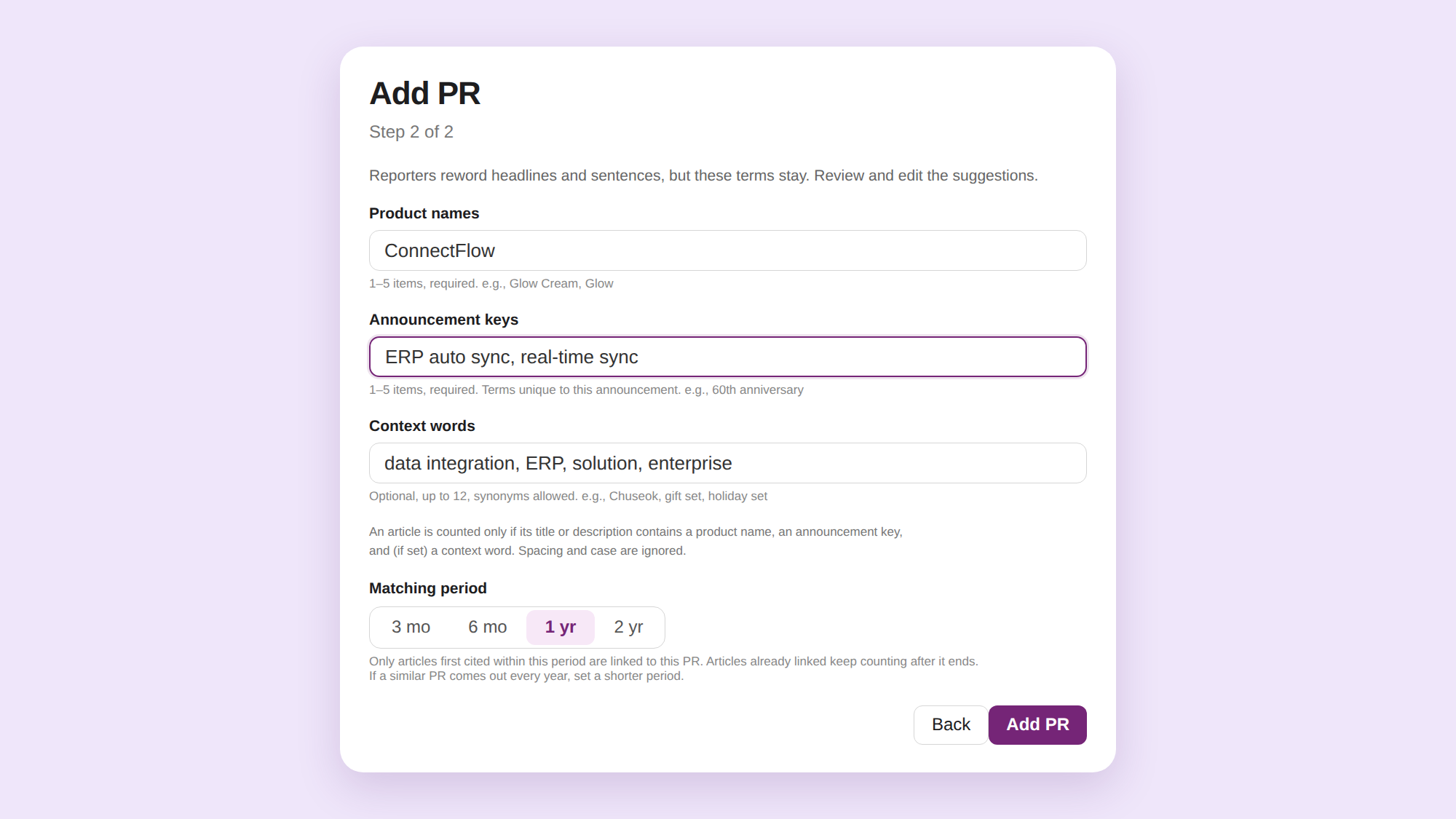
VIVI compares your keywords against the titles and descriptions of news articles to find candidates related to the announcement. With matching set up, it can analyze AI citations of your own release and of articles other outlets wrote from it. You don't have to register every article URL yourself. VIVI surfaces the AI-cited news articles that match.
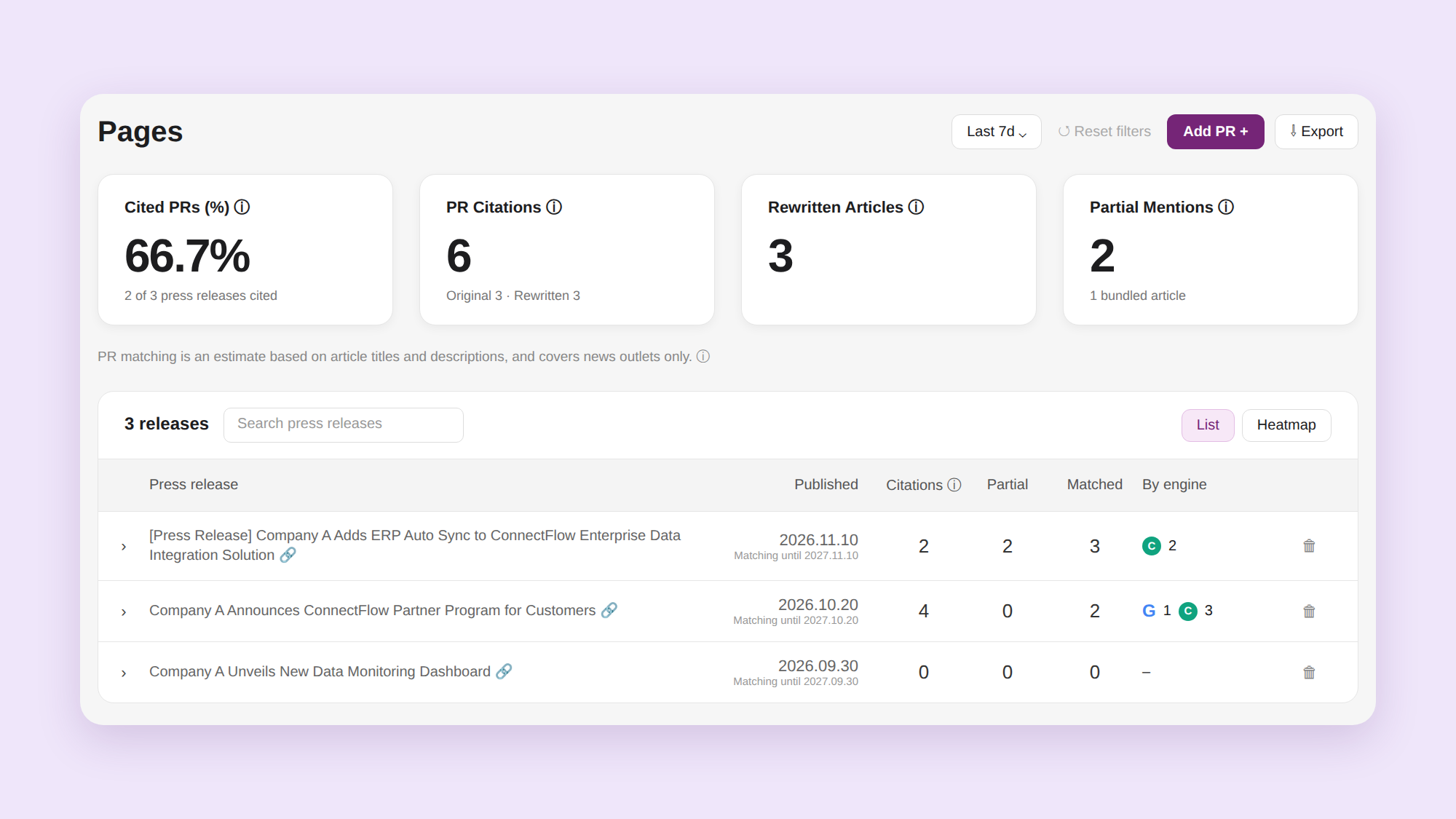
After you register a release, open Pages > PR to see AI citations for the original and the related articles. VIVI sorts related content into three types.
| Type | Meaning |
|---|---|
| Original release | The press release itself |
| Rewritten article | A news article rewritten from the press release |
| Partial mention | An article that mentions the announcement along with other news |
The key metric is PR Citations. It counts citations of the original release and rewritten articles together, so you see related citations you'd miss by checking the original alone. Cited PRs (%) shows what share of your registered releases were cited by AI. Partial mentions are counted separately.
Open an individual release to see its matched articles and how often each was cited in each AI engine.
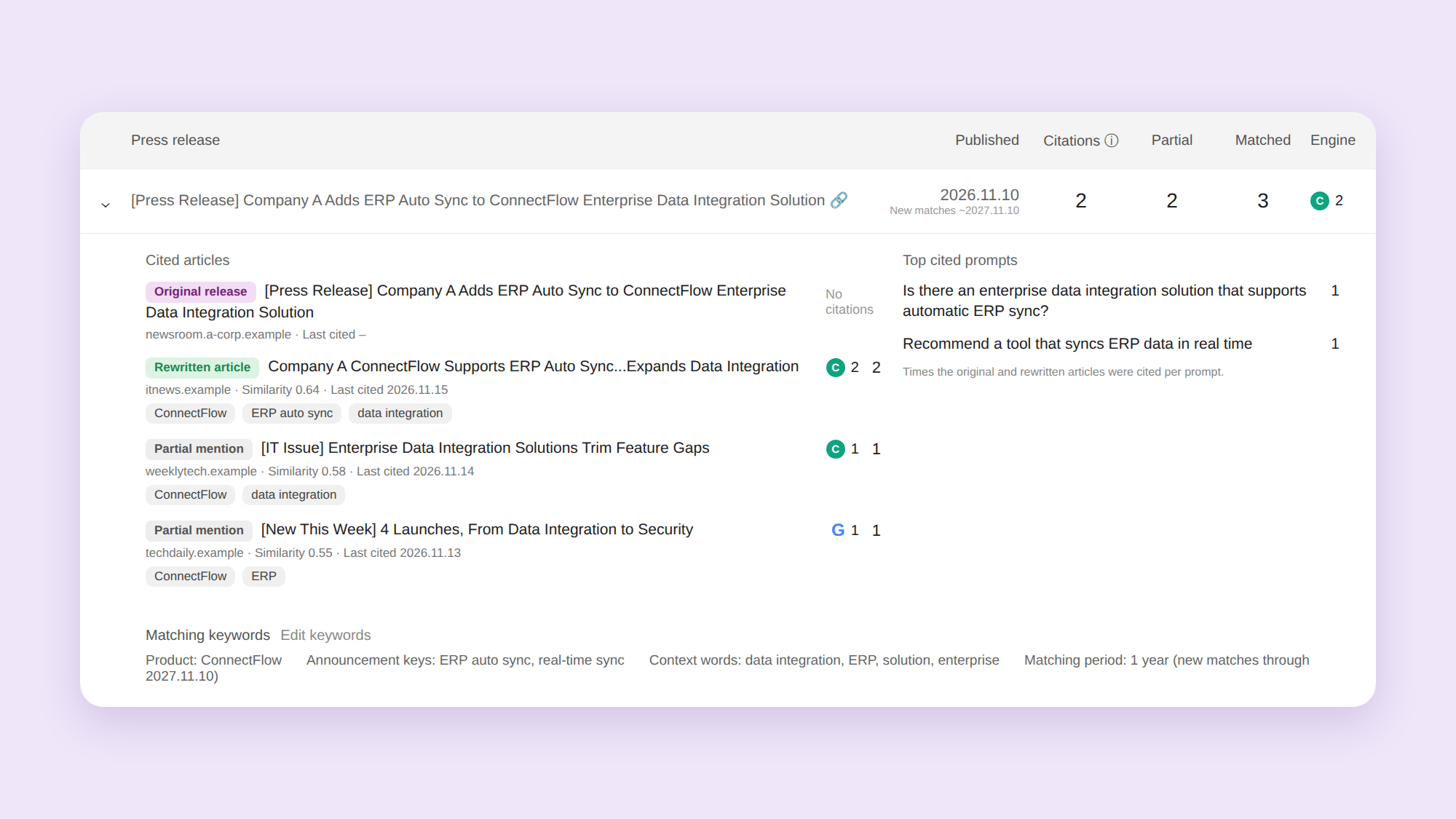
Suppose Company A's original release was never cited, but an IT trade outlet's article based on it was cited in a ChatGPT answer. Tracking the original URL alone would make it look like the release earned nothing. In VIVI, the citation of that rewritten article is linked back to the original release. You can view the original and the related citations separately and see the full results tied to one announcement.
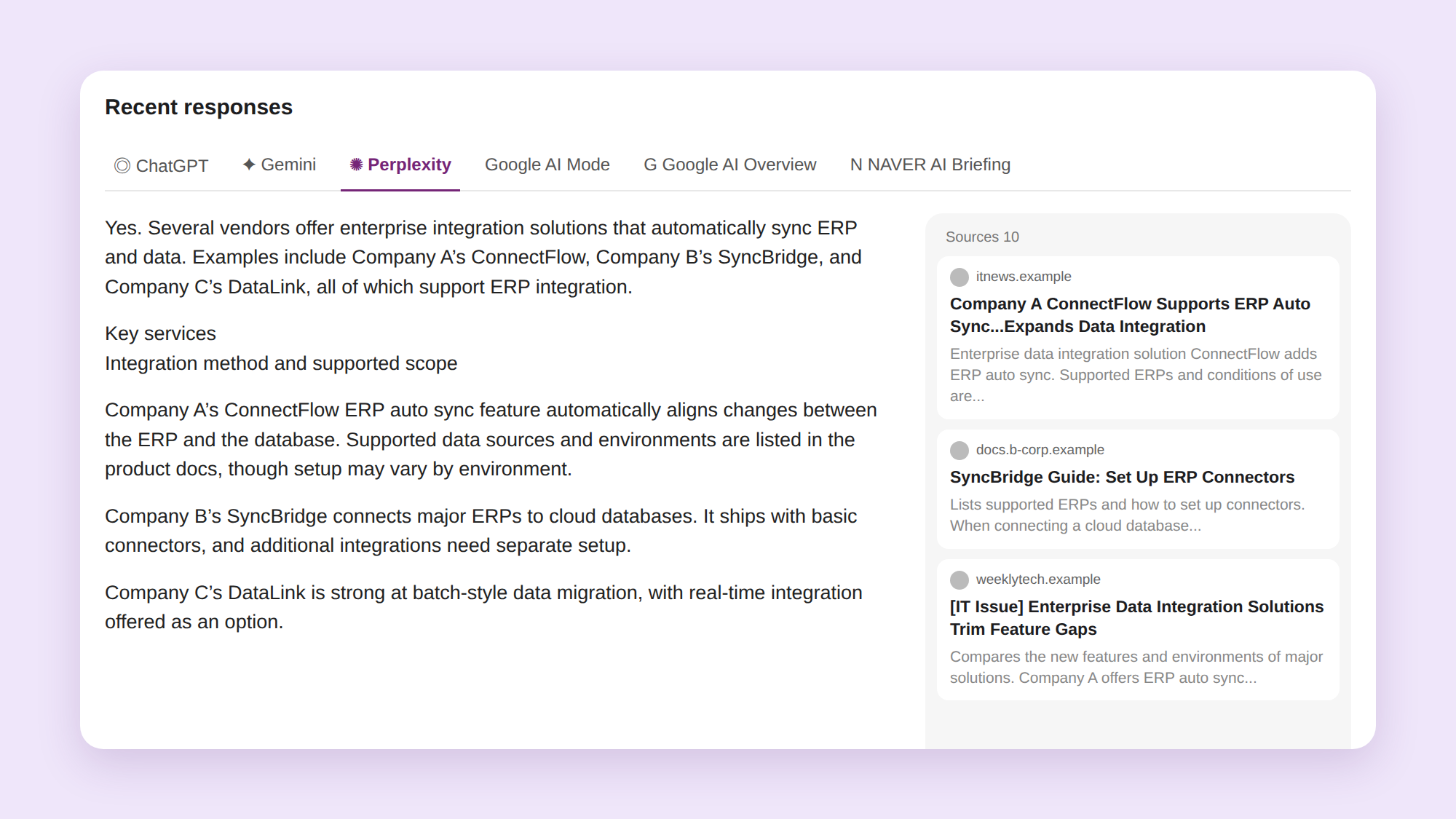
Once you know which articles got cited, look at which questions they were used for and what the answers actually said. Prompt Details in VIVI shows the answer text for each question along with the cited URLs. Focus on these:
Say Company A announced automatic ERP sync as its key message, but AI answers describe the product only as an "enterprise data management solution." The article is getting cited, but the technical differentiator your PR emphasized isn't making it into the answers. This is the kind of gap you can find here.
Reading questions and answers together takes you past counting citations. You see how the message you emphasized actually reaches AI search users, and you can decide which feature descriptions and evidence to strengthen.
Once you've seen how AI uses your announcements, apply that to the next piece. In particular, look at which parts of your brand's information aren't coming through. That tells you what to fix.
If a core feature isn't explained well in AI answers, add to the content that describes it. If articles from a different announcement were linked by mistake, adjust your matching criteria.
| Problem found | Next step |
|---|---|
| A core feature isn't explained well in AI answers | Strengthen feature descriptions in the official release and product page |
| Numbers or technical evidence in articles are unclear | Organize comparison baselines and technical materials |
| Your own newsroom release is rarely cited | Check page accessibility and body content structure |
| Related articles are missing or wrongly linked | Adjust matching keywords and period |
| There isn't enough information to answer customers' main questions | Plan the next PR message and supporting content |
If you can't edit a news outlet's article, improve what you do control: your newsroom release and official product information. If several articles describe the same feature vaguely, spell out the conditions and technical differentiators more clearly in the next release.
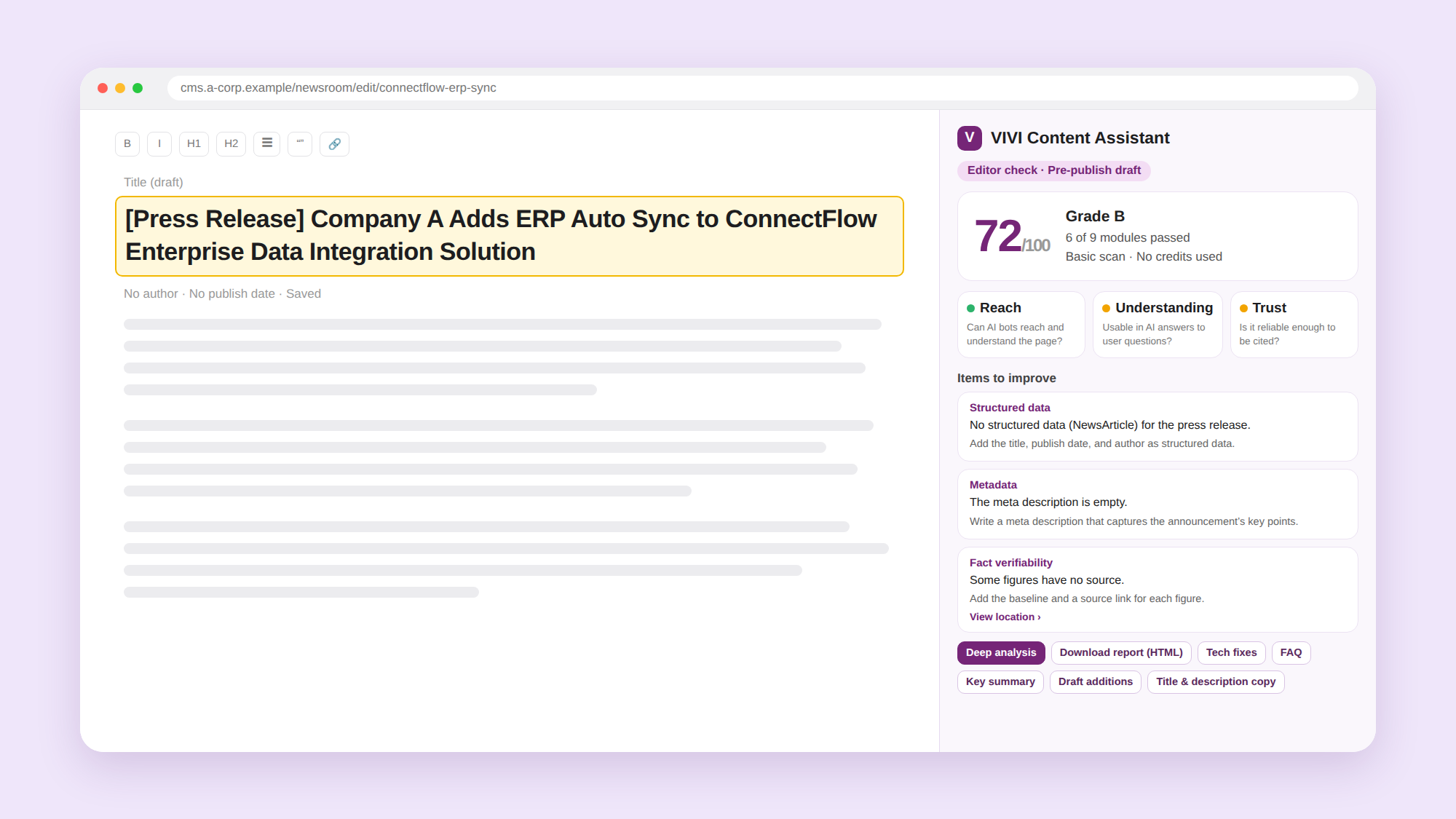
When you prepare your next release, VIVI Content Assistant can check content before and after publishing. With the Chrome extension, you can diagnose a draft right in your CMS editor.
Content Assistant checks content across 9 diagnostic areas, including AI crawler accessibility, structured data, metadata, and fact verifiability. Use the results to review how the content you publish on your official newsroom is structured and what information it gives, and fix gaps before it goes live.
Feeding citation analysis from past PR into your next release lets you fill in the information AI answers were missing, and catch technical and structural issues before publishing.
If your PR report already covers placement counts and outlet breakdown, you can add which articles AI search actually cited and which brand messages showed up in answers.
Here's one way to organize it:
| Area | Key metrics | What to look for |
|---|---|---|
| Media coverage | Number of placements, outlets | Which outlets ran it? |
| AI citations of PR content | PR Citations, Cited PRs (%) | Were the original and related articles cited in AI answers? |
| Related articles | Rewritten Articles, Partial Mentions | What kinds of related articles were found? |
| Messages in AI answers | AI answer per question, cited sources | Which brand message came through for which customer question? |
If you distribute three new releases in a month, you can add each announcement's AI citation status, plus representative questions and answers, from VIVI Pages > PR to your usual coverage numbers.
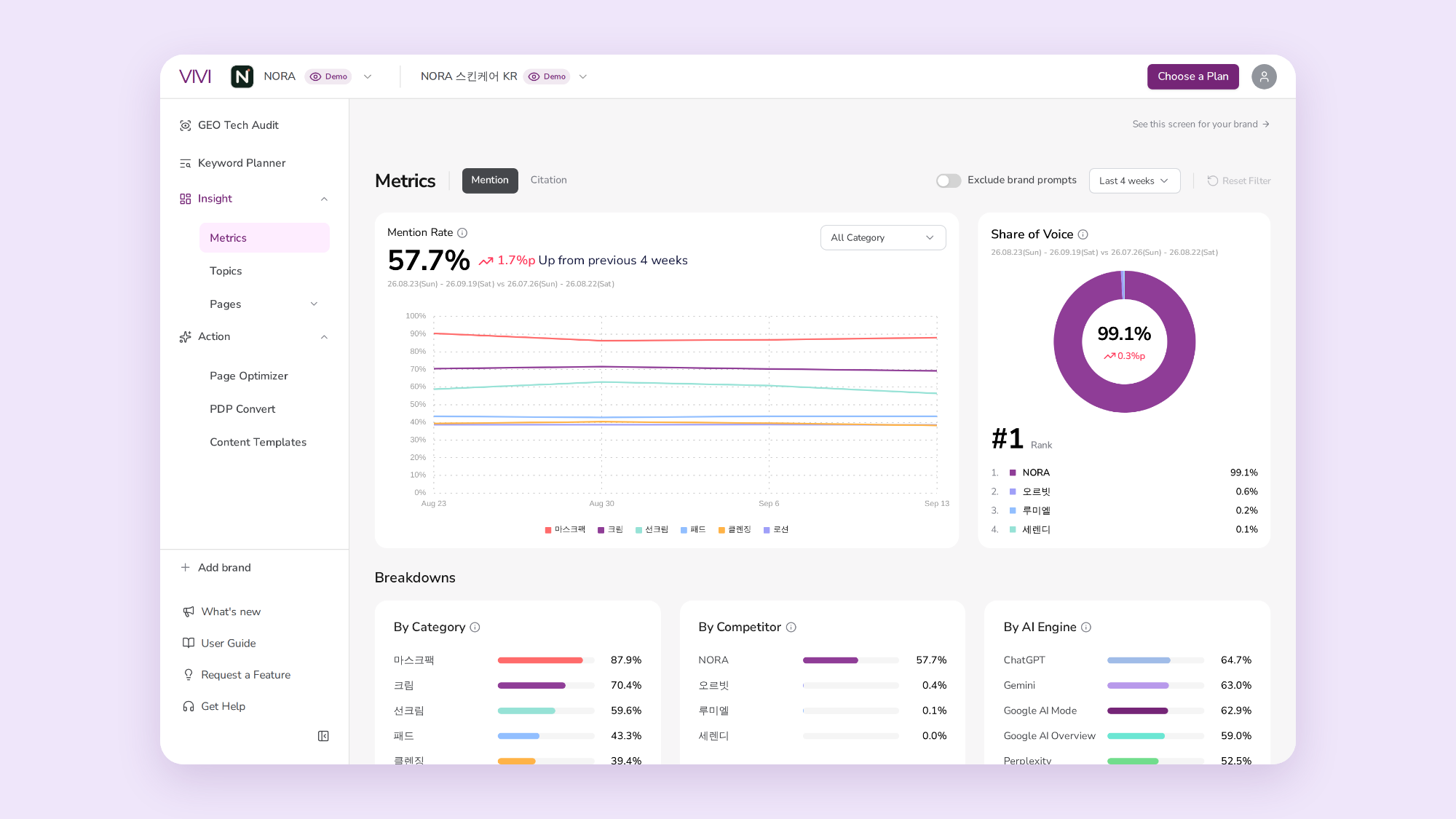
You can also compare mention and citation rates across periods in Metrics > Compare. That shows how citations of individual PR content sit alongside changes in your brand's overall AI visibility. The two metrics cover different scopes, so present them separately and compare using the same questions and AI engines.
If you work with a PR agency, ask them to keep each release's original URL, unique keywords, and distribution date together. It makes later article matching and analysis easier.
With AI citation data added to your coverage report, you can explain not just where articles ran, but which customer questions use your brand's information.
Checking coverage after distribution is still a core PR task. Add AI citations and you can see which customer questions your announcement is used in, and how the message you emphasized shows up in AI answers.
Looking at rewrites as well as the original release gives you a broader view of AI search exposure than a standard report does. The results also help you decide what to fix first in the next release.
Is your latest press release showing up in AI answers? Try VIVI's 7-day free trial to check your brand's AI citations and add a new view to your PR reporting.
Start your 7-day free VIVI trial →
Placement count and AI citation count are separate metrics. Alongside coverage, check which articles AI actually cites. Looking at the original and the rewrites together shows how AI search is using the announcement.
Yes. VIVI Pages > PR identifies related articles among AI-cited news using the product name and announcement-specific keywords, among other things. Rewrites you didn't register yourself count toward that announcement's AI citation results once they're matched.
VIVI's PR feature covers content published in news outlets. Your brand's official blog and social content are tracked in Pages > Channels, and sponsored and seeded content in External.