How to Turn a Sales Deck PDF into a Web Page for AI Search
Learn why a sales deck PDF falls short in AI search, how to rework it into a web page, and how to check it with VIVI Content Assistant and Insight.
Learn why a sales deck PDF falls short in AI search, how to rework it into a web page, and how to check it with VIVI Content Assistant and Insight.
Learn why a sales deck PDF falls short in AI search, how to rework it into a web page, and how to check it with VIVI Content Assistant and Insight.
Learn why a sales deck PDF falls short in AI search, how to rework it into a web page, and how to check it with VIVI Content Assistant and Insight.
Learn why a sales deck PDF falls short in AI search, how to rework it into a web page, and how to check it with VIVI Content Assistant and Insight.
In B2B marketing, the job is to show prospects your solution's strengths while they explore and compare options. If you're after demo requests and leads, your content also has to answer what buyers want to know and lead them naturally toward a consultation or a demo.
Your sales team's product deck probably covers it all, from key features and technical differentiators to customer cases. Yet what a prospect can find about your product in AI search is often limited. The deck is shared only by email or in sales meetings, or its key points never made it onto your website.
That means you don't have to plan new content from scratch. If you rework the key points of a sales deck PDF into web pages that answer customer questions, you give AI search an official source to draw on, and you open a path from interested buyers to an inquiry.
This article shows how to rework a sales deck into a web page that suits AI search. It then covers how to use VIVI to diagnose the page's AI search optimization and measure its citations after you publish.
Sales decks are built for customer meetings and proposals, where they explain a product's strengths in one pass. That works well for covering the company, features and customer cases together. When a prospect asks AI to solve a specific problem, though, the information they need may be hard to find in a deck.
The PDF format itself isn't the problem. Google supports PDF as an indexable file type. What matters is whether the deck's information is public, whether it can be read as text, and whether it is specific enough to answer a customer's question.
Start by checking these three things.
| What to check | Possible problem | How to check |
|---|---|---|
| Text accessibility | In an image-heavy PDF, key explanations may be hard to extract as text | Copy a sentence from the PDF and see whether it extracts correctly |
| Information structure | Product information follows the order of the presentation, so it can be hard to find the answer to an individual question | Find where the answers to your customers' most common questions sit |
| Public availability | A deck shared only by email or in sales meetings is hard for search systems to reach | Check whether the key information is also on a public URL on your website |
Say the sales deck states "supports a wide range of ERP systems," but your website doesn't spell out the supported environments. A prospect asks AI, "Which data automation solution works with our existing ERP?" To compare products, AI needs the integration scope and conditions that apply. If you put that information on a public web page instead of only in the deck, you give AI an official source for what the product can do.
A web page also does one more job: it can lead a buyer who has checked your product information to a demo request or an inquiry. So give AI the product details it needs, and also give buyers a way to learn more or book a consultation.
Moving a deck's content to the web doesn't mean listing every slide as is. Use the feature descriptions, technical specs and customer cases you already have, but organize them around how prospects look for information, not around the order a salesperson presents in.
B2B buyers evaluating a solution check whether it solves their problem, whether it's compatible with their systems and whether other customers have adopted it. Your web page can make the answers to those questions easy to find.
| Sales deck content | Web page component | What to consider when converting |
|---|---|---|
| Cover and one-line product intro | Hero: title, intro copy, CTA | State clearly what problem the product solves |
| Customer problem and background | Body text: problem and solution | Tie it to questions customers actually ask |
| Key features and differentiators | Cards: one per feature | Make each feature's purpose and use case specific |
| Technical specs and supported environments | Spec table: specs and comparison table | Write the supported scope and conditions as text |
| Customer cases | Body text or Image + text | Use cases you can make public, with evidence for results |
| Adoption process and repeat questions | FAQ | Include the questions sales hears most |
| Deck download and consultation info | CTA band | Lead to a demo request or inquiry |
You don't need to publish everything. Put what buyers need while exploring, such as key features and conditions of use, on the web page, and share proposal details and quotes during consultations.
The point is to give enough information for buyers to compare your product, while making it easy for those who need a closer look to get in touch.
Say a company sells quote automation software for businesses. The first slide of its sales deck reads: "Quotes, now automatic. Sort everything at once and handle everything at once." It works for a salesperson presenting the product, but on its own it doesn't tell a reader which tasks get automated.
On the web page, you can turn this into the heading "How are quote requests sorted automatically?" and explain how the feature works. If the feature sorts quote requests received by email by item and delivery date and routes them to the right person, state exactly that in the body. Adding a table of supported file formats and sorting criteria gives buyers what they need to judge whether the product fits.
Keep the value the deck emphasizes, and turn it into concrete product information that AI search and prospects can verify.
Feature descriptions alone rarely move an interested buyer to the next step. B2B products especially vary by the systems and work environments each company uses, so buyers often need to confirm whether adoption is actually possible.
For the quote automation product, you could describe the supported document formats, the systems it integrates with and the adoption process, then offer an inquiry path such as "Check whether this fits our quoting process." Buyers who want a fuller product deck can download it, and buyers who want to confirm the fit can request a demo or contact sales.
A page built this way serves both as product information AI search can find and as a page that converts leads.
Once you've moved your deck's content to a web page, the next step is to check two things: whether the page is in a state AI search can use, and whether AI answers actually cite it. In VIVI, you can diagnose the page's optimization with Content Assistant and check real mentions and citations of your brand and content with VIVI Insight.
VIVI Content Assistant is a Chrome extension that diagnoses a page's AI accessibility, information structure and more, and points out what to improve. Open it on the page where you moved your deck's content and run the page audit. You get a score out of 100 and GEO diagnostics across nine areas, including AI crawler accessibility, structured data, metadata and factual verifiability.
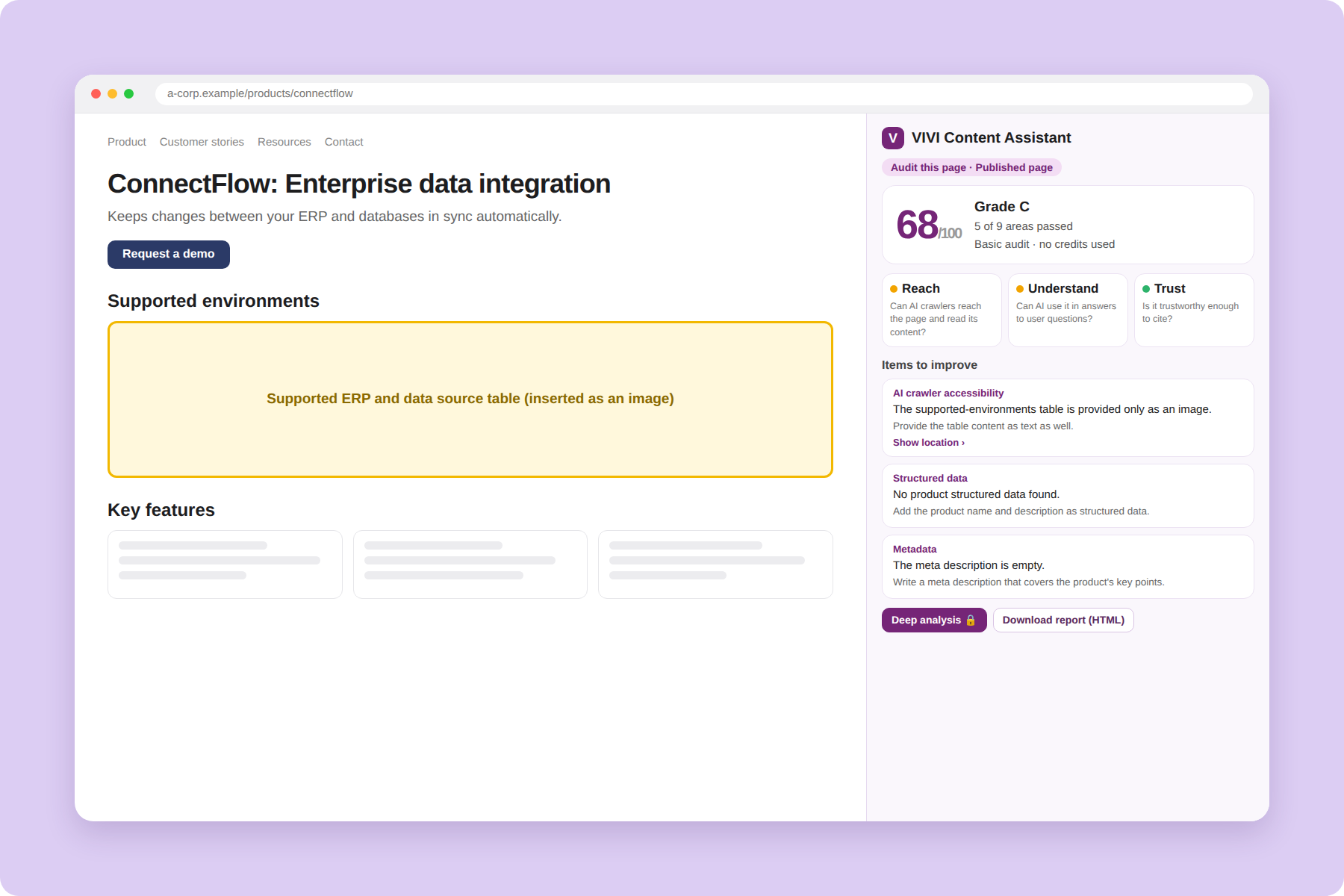
The results list what to improve, with guidance. For example, if you inserted the product spec table from your deck only as an image, provide the key content as an HTML table too. If metadata is missing or the heading structure is off, the audit shows what to fix.
With Content Assistant, you can check the structure AI search systems need to collect and understand your information while you move the deck's content to the web. If a fix needs a developer, download the results as an HTML report and share it with your website team.
After you publish the page, VIVI Insight shows whether AI answers actually cite it. First, register the new page's URL under Pages > Official Website. You can then see how many times it has been cited and which questions used it as a source.
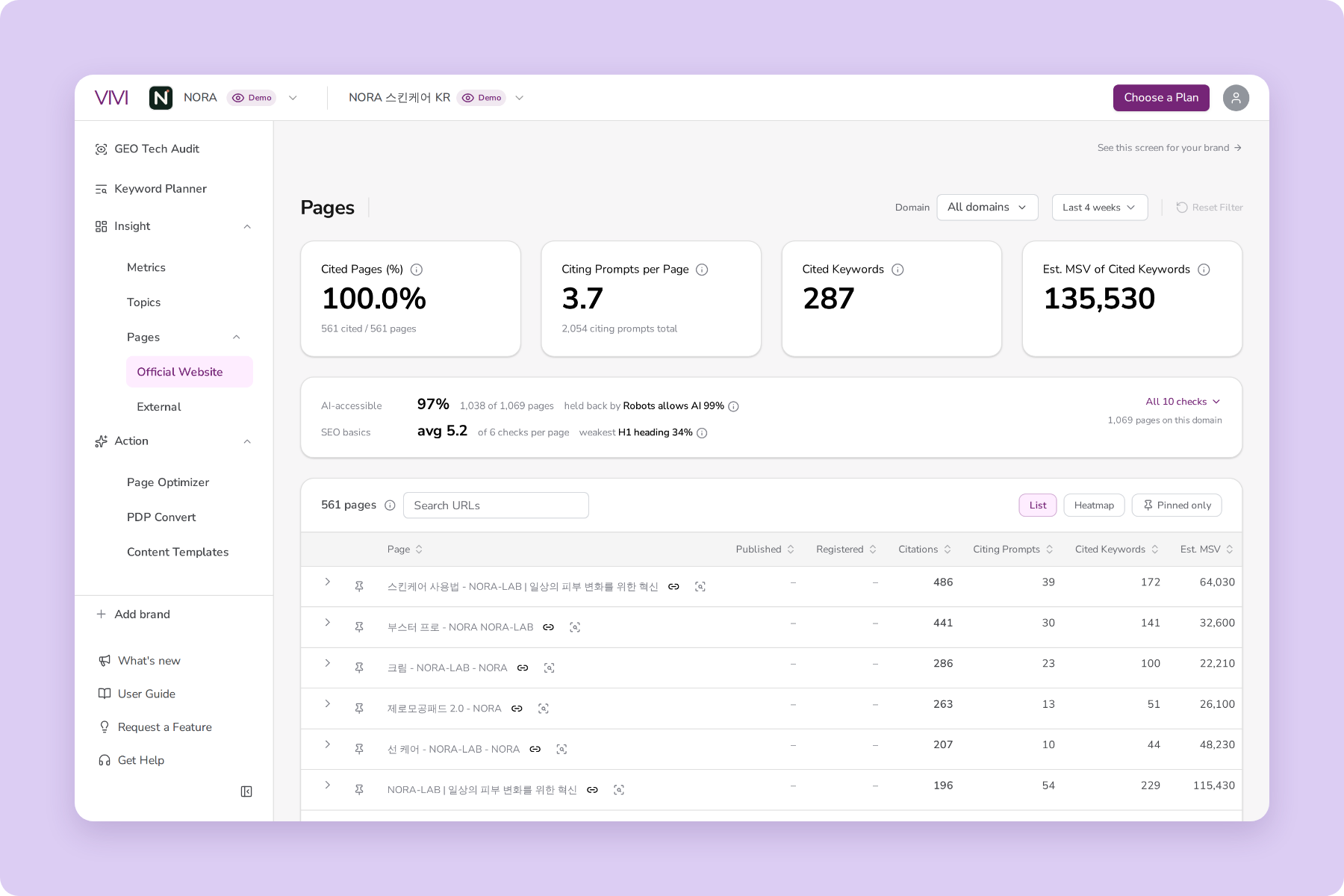
Say you built a page explaining an ERP integration solution. Check whether it gets cited in questions about the product's features or comparisons with competing solutions. Looking at citation counts together with the customer questions behind them shows what information the page provides in AI search.
You can check the brand's overall GEO performance in Metrics. Mention Rate, Citation Rate for your own domain and Share of Voice against competitors show how often your brand appears and gets cited in AI search.
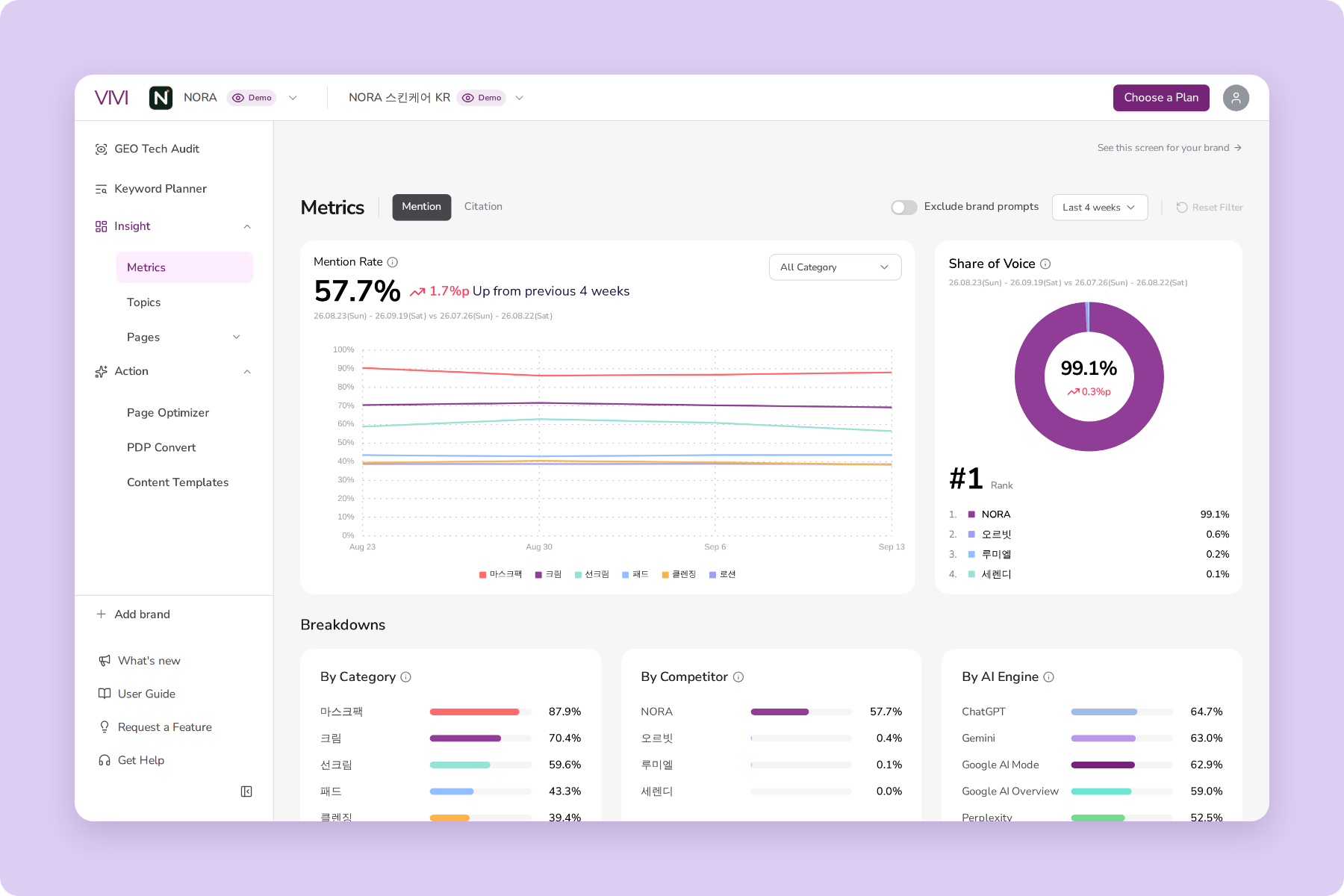
Page-level citations and overall brand visibility cover different scopes, so look at them separately. AI answers can also change over time even for the same question, so it helps to watch changes over a period and against competitors rather than a single reading.
As a B2B marketer, you need to know more than whether AI cites a page. You also need to know whether the new page brings prospects to your site and leads to inquiries. In VIVI you can see citations for each page, and with Google connected you can also see traffic and conversion data. Add data from your web analytics tool and CRM, and you can measure performance in separate layers.
| Area | Key metrics | What to check |
|---|---|---|
| AI search visibility | Page citations, cited questions | In which customer questions is the new page used? |
| Website traffic | Page visits, traffic from AI search | Does it lead to actual site visits? |
| Lead conversion | Deck downloads, demo requests, inquiries | Do visitors take the next step? |
| Lead quality | Qualified leads, sales opportunities | Do the leads become real sales opportunities? |
If a new page starts getting cited but brings few inquiries, check the CTA placement, the inquiry process and whether the page gives buyers enough to evaluate the product. If AI rarely cites it, check whether the customer question is being measured, and compare your page with the other sources AI cites in its answers.
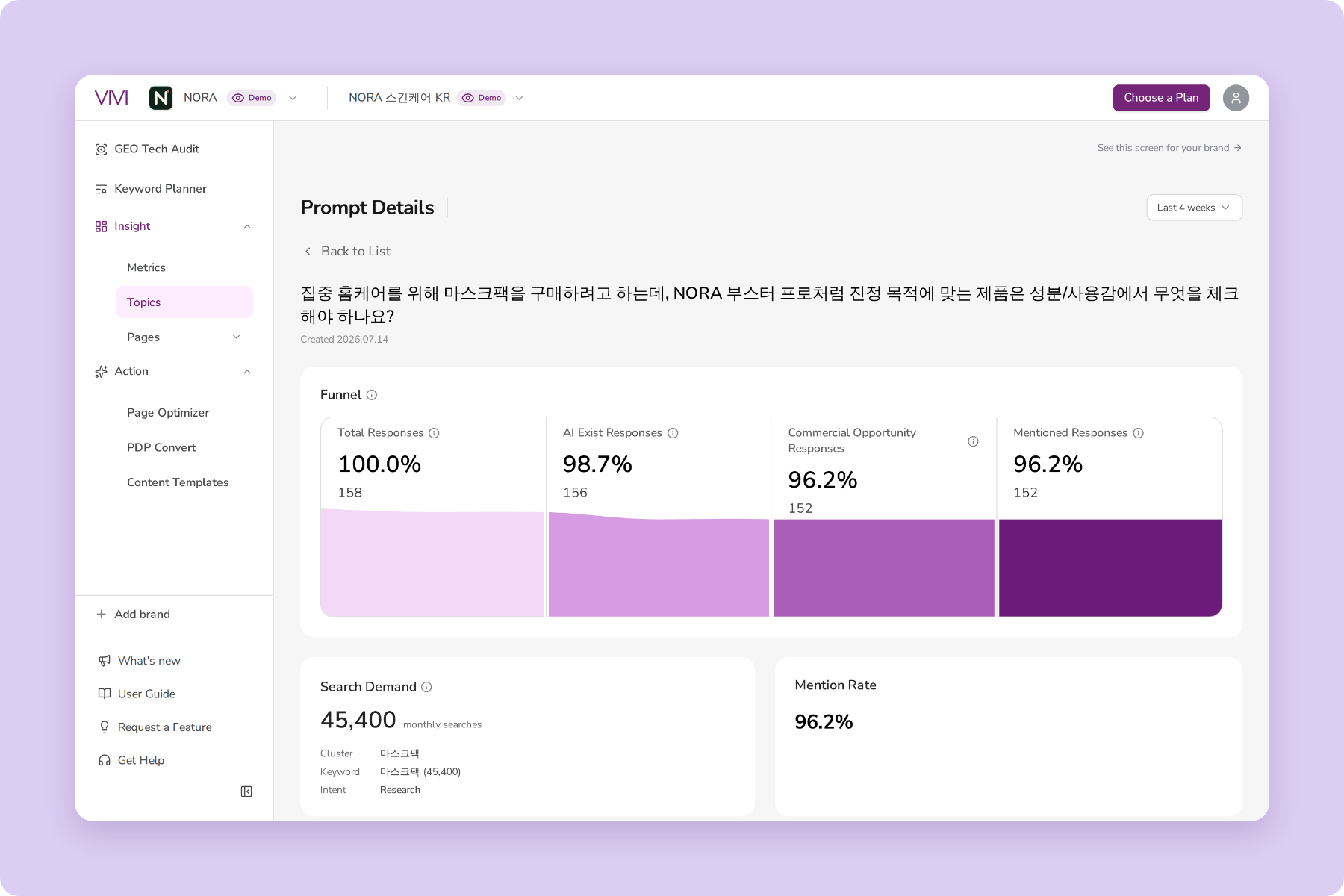
Measuring AI citations and lead conversion separately lets you set improvement priorities from both search visibility and actual business results.
After you move your sales deck's key information to a web page, diagnose its optimization with VIVI Content Assistant and check real AI citations with VIVI Insight. Sign up for VIVI's 7-day free trial to look at your website's AI search performance.
Check your AI search performance with a 7-day free VIVI trial →
B2B companies already hold plenty of product information meant for customers. Sales decks, technical documents and proposals may contain the features, conditions of use and real cases prospects want to know about.
Rather than keeping that information in sales meetings, publish it as web pages prospects can use when they explore and compare solutions in AI. Start by reorganizing the deck's key points around customer questions and building a path to demo requests and inquiries.
After you publish, check whether the page gives AI search the information it needs, and look at its actual citation performance. Diagnose the page with VIVI Content Assistant and check brand and page citations with VIVI Insight, and you can pinpoint what to add and which pages need work next.
Is the page you built from your sales deck getting used in AI answers? Start a 7-day free VIVI trial to see where you stand in AI search, and begin improving the content that turns into buyer inquiries.
Start your 7-day free VIVI trial →
Google supports PDF as an indexable file type. But an image-heavy PDF can be hard to extract text from, and a deck that isn't public can't be reached by search systems. If you also provide the key information as a web page, it's easier to organize it around customer questions, keep it updated and lead readers to an inquiry.
No. VIVI Content Assistant and Insight don't convert a sales deck PDF into a web page. They diagnose a page's AI search optimization and show its actual mentions and citations. Rework the deck's key points into a web page first, then check and improve it with VIVI.
No. Put what buyers need while exploring, such as key features and conditions of use, on a public page, and manage proposal details and quotes separately. Explain your strengths fully in public content, then lead readers to the next step: a deck download, a demo request or an inquiry.