How to Optimize Naver Smart Store Product Information for AI Shopping Recommendations
Learn how to optimize Naver Smart Store product information for AI shopping, from specifications and shipping to reviews and HTML product pages.
Learn how to optimize Naver Smart Store product information for AI shopping, from specifications and shipping to reviews and HTML product pages.
Learn how to optimize Naver Smart Store product information for AI shopping, from specifications and shipping to reviews and HTML product pages.
Learn how to optimize Naver Smart Store product information for AI shopping, from specifications and shipping to reviews and HTML product pages.
Learn how to optimize Naver Smart Store product information for AI shopping, from specifications and shipping to reviews and HTML product pages.
To prepare for AI-powered product recommendations on Naver Shopping, sellers should start by reviewing their product specifications, shipping information, and customer reviews. Accurate, consistent product information helps AI compare products against the purchase criteria customers specify.
In September 2026, Naver announced enhancements to its AI Shopping Agent, including the integration of real-time shipping information. According to Naver, by September, conversations with the AI Shopping Agent had increased by approximately 60% and transaction value by 82% compared with June, shortly after its official launch. These figures reflect the growing adoption of a shopping experience in which customers describe their product preferences and delivery requirements to AI.
This shift also introduces new priorities for Naver Smart Store sellers. Beyond visibility in traditional search results and shopping platforms, sellers need to understand what information AI uses when comparing and recommending products based on customers' purchase criteria.
In this guide, we'll examine which product information Naver Smart Store sellers should review, based on Naver's published explanation of its AI Shopping Agent, and how to improve product detail pages using VIVI's PDP Convert.
Naver's AI Shopping Agent interprets shoppers' product preferences and purchase requirements to recommend suitable options. For example, if a customer asks for "a hot pot meal kit that can arrive by tomorrow," the AI Shopping Agent can identify eligible products based on the customer's delivery address and provide information such as estimated arrival dates and order cutoff times.
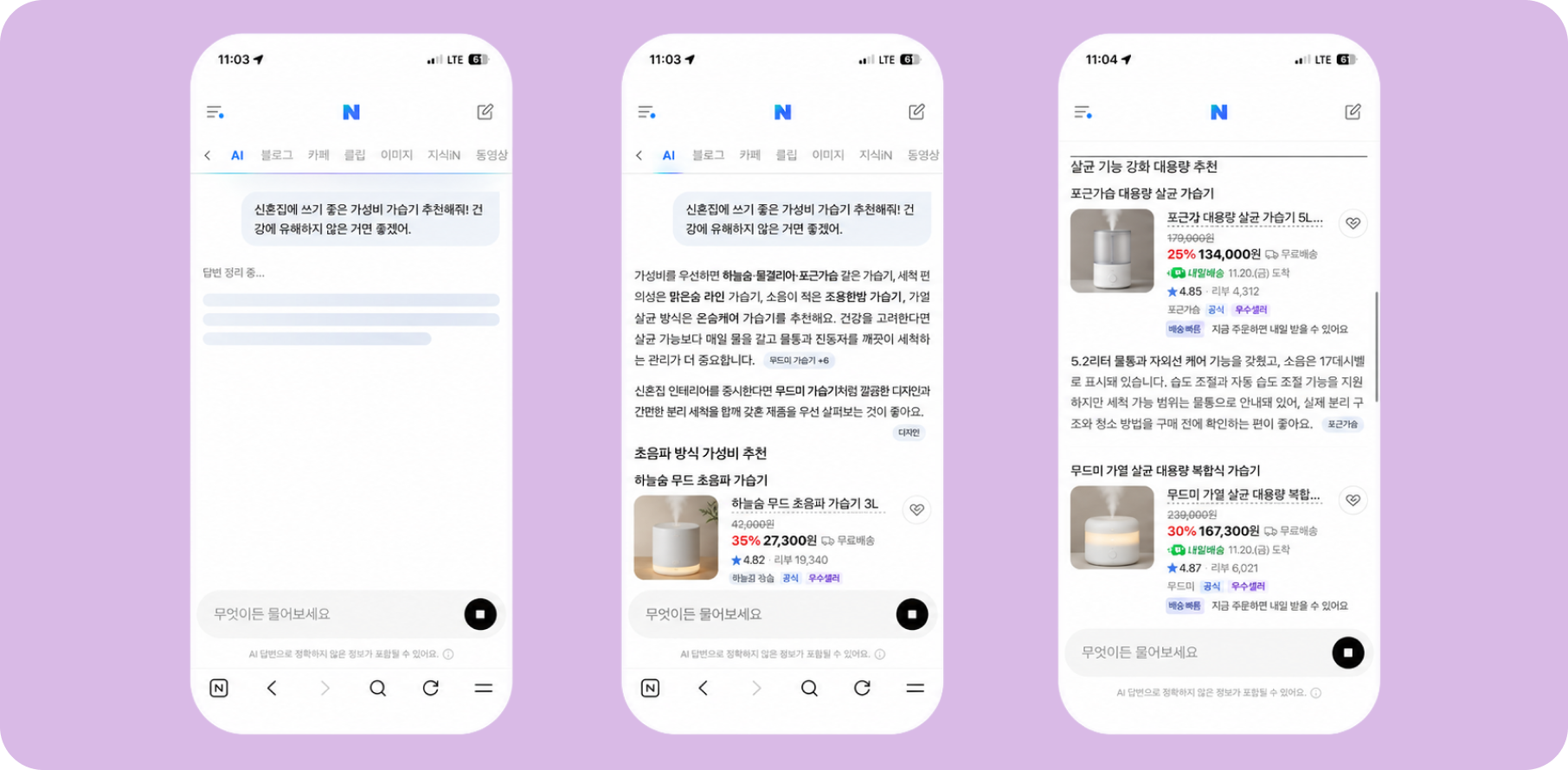
Naver has stated that its recommendation experience draws on product specifications, real-time shipping information, customer review data, and personalized recommendation technology. Smart Store sellers can organize their review of this information into three main areas.
| Data Used by Naver | What Sellers Can Review | What to Check |
|---|---|---|
| Product Specifications | Product titles, categories, attributes, options, and prices | Are key details such as size, capacity, and materials accurately listed for customers comparing products? |
| Real-Time Shipping Information | Shipping methods, dispatch timelines, and order cutoff times | Do the shipping settings match actual fulfillment operations? |
| Customer Review Data | Customer reviews and product descriptions | Does the product description accurately reflect the features and experiences customers frequently mention? |
Sellers can directly configure and manage product specifications and shipping information. While reviews are written by customers, sellers can use them to understand which product attributes customers value most and refine their descriptions accordingly.
When shopping with AI, customers may describe more than a product category. They can also specify how they intend to use the product, their preferences, and delivery requirements. Sellers therefore need to anticipate the conditions customers may include in their questions and identify where the corresponding product information is listed within Naver Smart Store.
For example, a skincare seller can map common customer questions to product information fields as follows.
| Customer Question | Product Information to Check | Where to Review It |
|---|---|---|
| Is it suitable for sensitive skin? | Intended skin types and usage precautions | Product attributes and detailed description |
| How does the price compare for its size? | Volume, price, and available options | Product attributes and options |
| Can I receive it by tomorrow? | Delivery availability, dispatch timeline, and order cutoff time | Shipping settings |
| How is this serum different from others? | Key ingredients, texture, and usage instructions | Detailed description |
Mapping customer questions to specific product fields makes it easier to identify which purchase criteria are not adequately addressed and where the missing information should be added. It is also important to keep product information consistent across titles, attributes, options, and detailed descriptions.
After reviewing product attributes and shipping settings, the next step is to assess the information provided on your product detail pages.
On Naver Smart Store, ingredients, usage instructions, and product features are often presented in a single long image. While this format can be effective for visual storytelling, information contained only within images may be difficult for systems that primarily extract webpage text to access and use.
A practical approach is to preserve the existing product detail-page design while also making key product information available as HTML text. This helps customers find the information they need and gives search systems a more accessible structure for processing product content.
BubbleShare's PDP Convert extracts product information from image-based detail pages and transforms it into text and HTML. It can preserve the existing visual design while making information embedded in images available as HTML text, allowing sellers to improve content structure without rebuilding the entire product detail page.
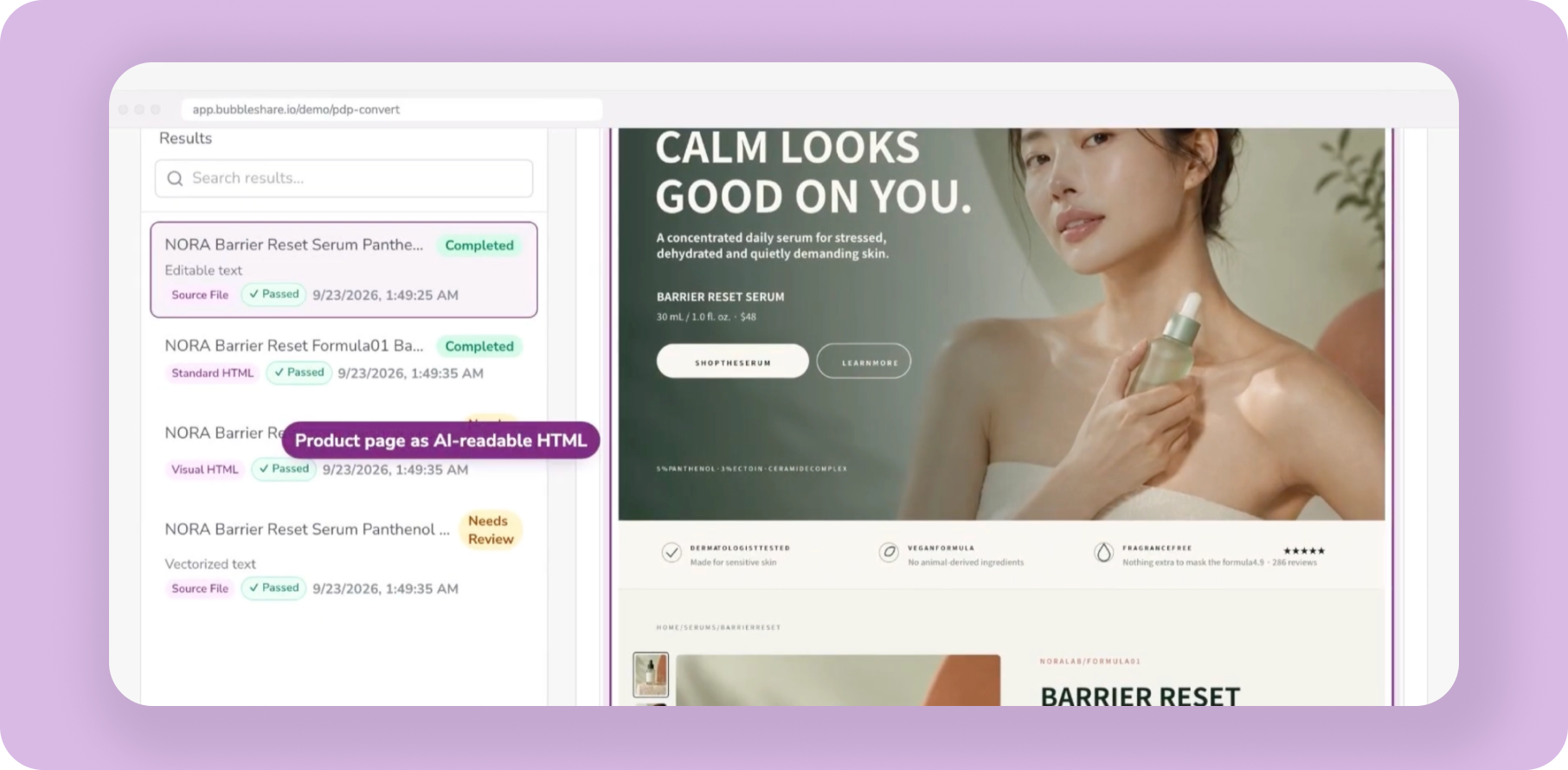
A Naver Smart Store product detail page can be converted through the following steps:
Upload the Image: Upload the existing product detail-page image to PDP Convert.
Configure the Sales Channel: Select Naver Store under Retailer to use the relevant product-title rules and reference AI responses. This option is available for projects that collect responses from Naver.
Choose a Generation Mode: Select Visual HTML to preserve the existing design, or Standard HTML to reorganize product information into sections, tables, and FAQs.
Start the Conversion: Review the product category, template, and other relevant settings before starting the process.
Once the conversion is complete, PDP Convert displays the generated product descriptions, specification tables, and FAQs. Before publishing, review the output against your existing Smart Store listing and official product documentation.
| Review Area | What to Check |
|---|---|
| Product Spec | Do specifications and ingredient details match the actual product and its Smart Store attributes? |
| Listing Title | Does the title accurately reflect the product and follow the sales channel's naming rules? |
| FAQ | Do the answers accurately address relevant customer questions? |
| HTML Editor | Is all essential product information accurately represented, with nothing important missing? |
We recommend checking the final content against official product documentation before publishing. You can edit the copy as needed and use Live Preview to inspect how the product detail page will appear.
After reviewing the output, use Export HTML to download the completed content and apply it using Naver Smart Store's supported product description editing formats. This approach allows sellers to preserve the visual quality of their existing detail pages while making key product information easier for customers and search systems to access.
If important product features and usage instructions are available only within images, PDP Convert can help make that information available as text and HTML. With VIVI's 7-day free trial, you can use your existing product detail pages to start improving how product information is presented.
Start Your 7-Day Free Trial and Optimize Your Product Detail Pages →
After updating product information and detail pages, the next step is to check how your products appear in AI recommendations and whether your product pages are cited as sources in AI-generated responses.
Comparing recommendations and citations before and after the changes helps you understand how the updated information is being used in AI search.
One approach is to test relevant purchase criteria directly in the Naver Shopping app's AI Shopping Agent. For example, entering a query such as "a serum suitable for sensitive skin" allows you to examine whether your product is recommended and which product features AI highlights.
You can also check whether your Smart Store product pages are cited by other AI search engines. VIVI Insight can help analyze citations to those pages across the AI engines it monitors.
In VIVI, register the URL of your Smart Store product page under Pages > External. You can then review how many times the registered product page has been cited (Citations) and which customer queries are associated with those citations (Citing Prompts) across the monitored AI engines. This helps identify the types of customer questions for which your Smart Store listing is used as a source.
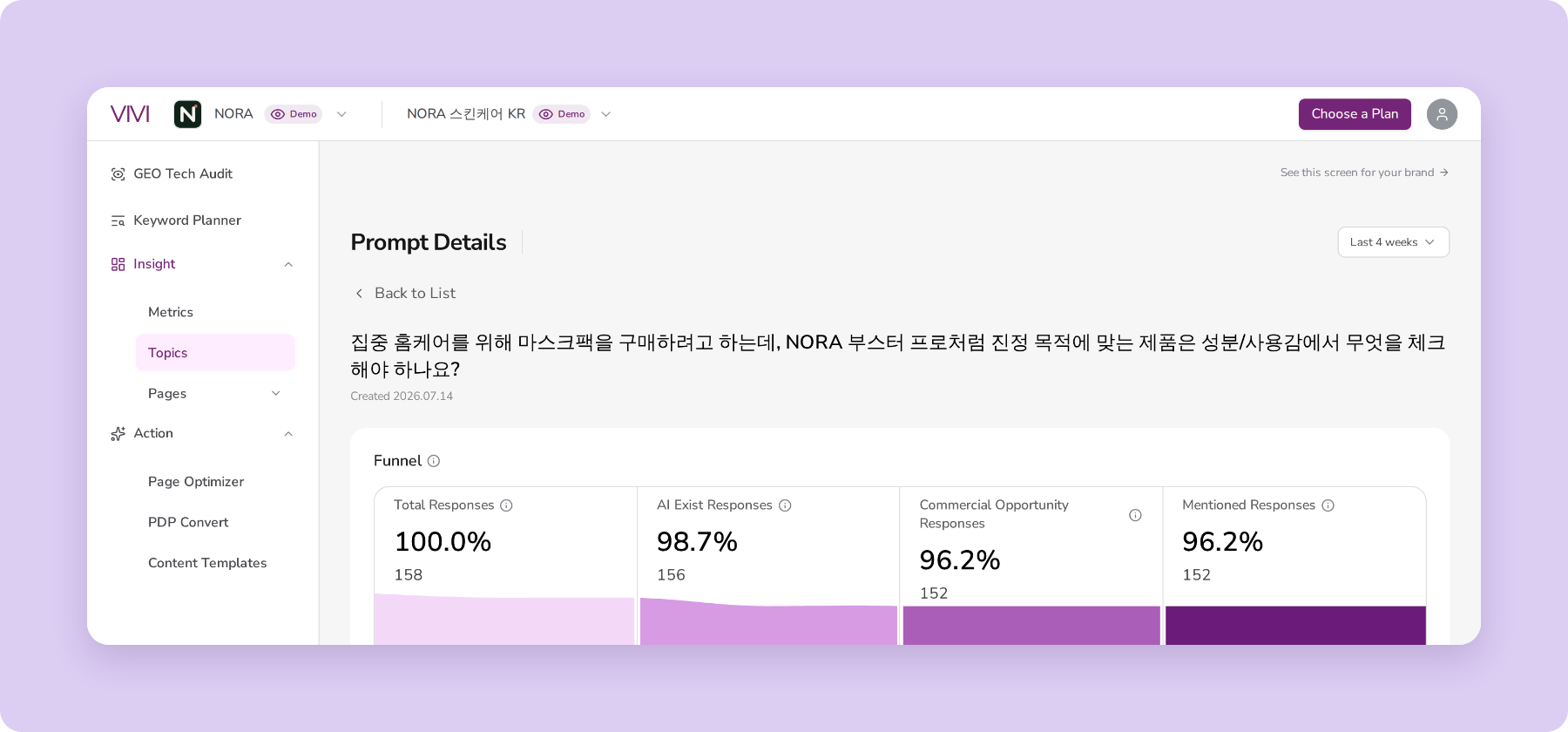
Prompt Details provides the full AI responses and their citation sources for individual customer queries. Comparing product descriptions and competitor recommendations within these responses can help reveal which product attributes AI uses and what information may still need improvement.
It's important to distinguish the scope of these measurements. NAVER AI Briefing, which VIVI monitors, is a different service from the AI Shopping Agent within the Naver Shopping app. Product recommendations within the shopping app should be checked in that service, while VIVI helps track citations to product pages across NAVER AI Briefing and other supported AI engines.
By monitoring recommendation content and page citations for the same customer queries after making improvements, sellers can identify which purchase criteria lead to more detailed product descriptions and which product pages begin appearing as cited sources. These findings can help prioritize the next products or sales channels to optimize.
Because Naver's AI Shopping Agent uses product specifications, real-time shipping information, and customer review data, Smart Store sellers should ensure that the information customers need to evaluate their purchase options is accurate and consistent across product titles, attributes, shipping settings, and detailed descriptions.
If important product details are available only within images, providing them as HTML text can make the content more accessible to search systems.
With BubbleShare's PDP Convert, sellers can convert product information into HTML while preserving the existing detail-page design. They can then use VIVI Insight to check whether their Smart Store product pages are cited by the supported AI engines.
Does your Naver Smart Store product detail page provide the information AI search systems need to reference? Start improving your product information with VIVI's 7-day free trial.
Start Your 7-Day Free Trial of VIVI →
Based on the product specifications, real-time shipping information, and review data Naver has identified, sellers can start by checking the accuracy of their product titles, attributes, and shipping settings. It's also important to ensure that the information customers need for product comparisons is consistent with the detailed product descriptions.
VIVI Insight provides AI responses and citation sources from supported engines, including NAVER AI Briefing. Recommendations made by the AI Shopping Agent within the Naver Shopping app can be checked separately in the shopping app. Results from both services can be analyzed as distinct inputs when evaluating AI shopping performance.
Making information embedded in images available as HTML text can improve how easily search systems access and process product content. It also allows sellers to preserve their existing detail-page design while presenting key specifications and usage instructions in text, improving both search accessibility and the customer experience.